
Create Magical Studio Ghibli AI Art from Your Photos
Transform your photos into the iconic Studio Ghibli AI art style. This friendly guide shows you how to use AI to capture that whimsical, animated magic.
When you hear "Studio Ghibli AI," what probably comes to mind are those enchanting, anime-style images popping up all over social media. It’s a huge trend where AI art generators learn to mimic the iconic, hand-painted look of Studio Ghibli films.
It's important to know this is not an official tool from the legendary Japanese studio. Instead, it’s a style that apps like Tooncraft can apply to your photos, transforming them into whimsical art. It’s a fun way for fans to imagine themselves inside the magical worlds they grew up adoring.
The Magic Behind Ghibli AI Art
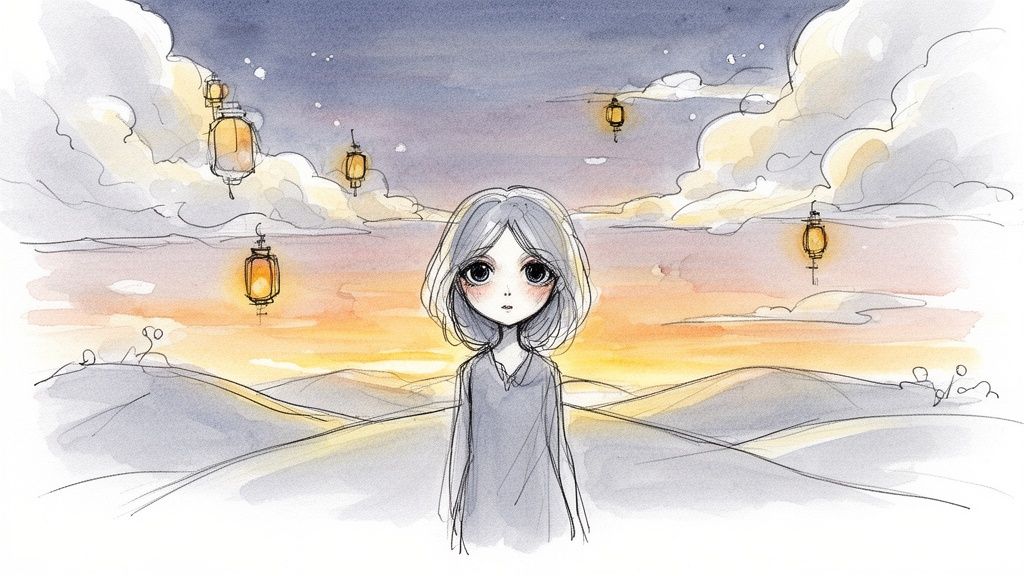
The fascination with Studio Ghibli AI art is more than just a passing internet fad. It's a powerful blend of nostalgia, creativity, and technology that’s surprisingly easy to use. For decades, the films of Hayao Miyazaki and Isao Takahata have captivated us with their unique visual language. Now, anyone can grab a little piece of that magic for themselves.
This whole movement connects our shared love for Ghibli's incredible storytelling with what today's AI can do. It taps into that universal desire to see our own lives and our world through a more enchanting lens.
Why We Are So Captivated
The charm of the Studio Ghibli style comes down to a few key artistic elements, which AI models are trained specifically to understand and replicate. These tools analyze countless frames from classic films to learn the DNA of the Ghibli aesthetic.
This lasting appeal has also meant huge commercial success. Studio Ghibli's films have brought in staggering box office numbers—Spirited Away alone grossed ¥31.7 billion in Japan. This worldwide love affair explains why AI tools that recreate its style are taking off. For a deeper dive into the numbers, you can get a closer look at Ghibli's box office success on CBR.com.
The key visual traits that Studio Ghibli AI works so hard to reproduce are:
- Lush, Watercolor Backgrounds: Those soft, painterly landscapes that feel alive with atmosphere and tiny details.
- Expressive Character Designs: The simple but incredibly emotional faces with large, soulful eyes.
- A Gentle, Nostalgic Color Palette: A very specific use of light and color that makes you feel warmth, wonder, and even a little bit of melancholy.
Think of it this way: the AI isn't just slapping a filter on your picture. It's re-interpreting your photo, almost like a digital artist who has spent their entire career studying the Ghibli masters would. It translates real-world people and places into an authentic, Ghibli-esque illustration.
This has made creating beautiful, personalized art easier than it's ever been. Whether you’re an artist looking for a spark of inspiration, a content creator who needs a unique visual, or just a parent who wants a magical family portrait, Studio Ghibli AI is an instant gateway to a world of whimsy and wonder.
So, How Does an AI Learn to Draw Like Ghibli?
Ever wonder how Studio Ghibli AI pulls off its magic? It’s not just a fancy filter you slap on a photo. Think of it more like an incredibly dedicated art student who studies a master’s work, only this student can analyze an entire film library in the blink of an eye.
The AI pores over thousands of frames from classic Ghibli movies. It's not just memorizing what a scene from Spirited Away looks like; it’s breaking down the very essence of the Ghibli aesthetic into its core ingredients.
It’s learning the fundamental "rules" that make Ghibli, well, Ghibli.
- Soft, Painterly Textures: The AI learns to see and recreate those signature fluffy clouds and the gentle watercolor feel of the landscapes.
- Distinctive Color Palettes: It can tell the difference between the warm, sun-drenched golds of My Neighbor Totoro and the deep, mystical blues of a scene from Howl's Moving Castle.
- Expressive Character Features: It figures out how Ghibli artists draw eyes to show so much emotion with just a few simple, elegant lines.
Essentially, the AI builds its own "visual dictionary" filled with all the elements that make up the Studio Ghibli style.
Turning Your Photo into a Piece of Art
Once the AI has done its homework, it's ready to create. When you give it your photo or video, the model doesn't just paint over it. It acts like a skilled translator, reinterpreting your image using that Ghibli dictionary it built.
The AI looks at your photo and identifies the important stuff—your face, your hair, the trees in the background. Then, it goes to work, swapping out the real-world elements for their Ghibli-style counterparts. Your real smile gets translated into an expressive, hand-drawn one, and the ordinary trees behind you are reimagined with soft, painterly leaves.
The real trick is making it all look consistent. The AI applies its learned rules to every single part of the image, ensuring that the sky, the grass, and your face all feel like they belong in the same enchanting world.
This is what makes the final result feel so genuine. It’s not a cheap copy-and-paste effect. It’s a deep, computational understanding of an iconic art style, applied thoughtfully to create something brand new. Your photo's visual story is retold in the beautiful, familiar language of Studio Ghibli.
Your First Ghibli AI Masterpiece Step by Step
Ready to create your own whimsical portrait? Let's walk through how to make your first piece of Studio Ghibli AI art with Tooncraft. It only takes a few clicks to turn a regular photo into something magical.
Honestly, the most important part of the entire process happens before you even open the app: choosing the perfect photo. The quality of what you put in directly impacts the quality of what you get out. Think of it like giving an artist a reference picture—the clearer it is, the better the final portrait. A great photo gives the AI all the details it needs to work its magic.
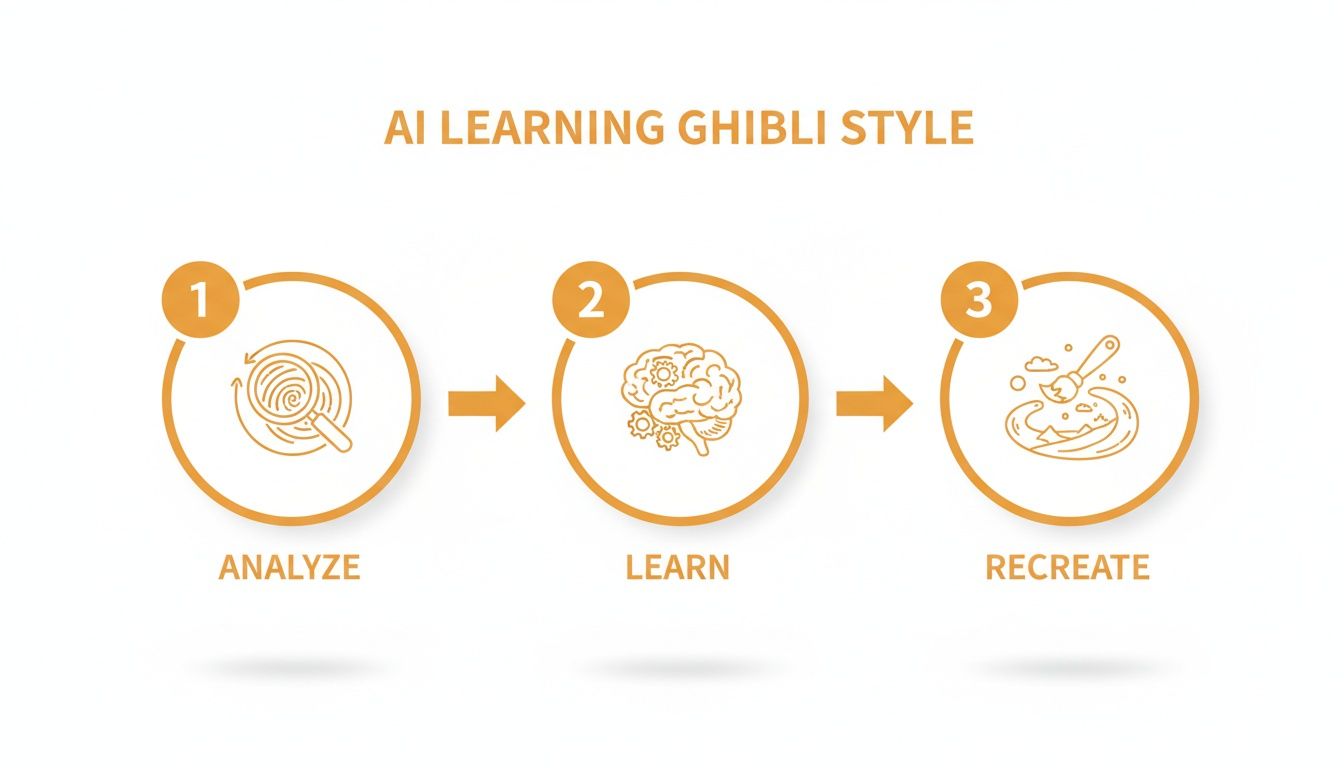
This little diagram shows that the AI isn't just slapping a filter on your picture. It's actually breaking down the Ghibli style into its core elements and then using those rules to repaint your photo from the ground up.
Tips for the Perfect Input Photo
Follow these simple guidelines when selecting a photo to ensure your Tooncraft Ghibli AI transformation is as magical as possible.
| Photo Element | Best Practice | Why It Works |
|---|---|---|
| Lighting | Soft, even, and natural light is your best friend. Avoid harsh glares or deep shadows. | Good lighting illuminates your features clearly, so the AI doesn't have to guess what's hidden in the shadows. |
| Facial Features | Make sure your eyes, nose, and mouth are clearly visible and unobstructed. | The AI uses these key features as anchor points to accurately capture your likeness in the Ghibli style. |
| Background | A simple or out-of-focus background works wonders. Avoid busy, cluttered scenes. | A clean background ensures the AI focuses all its attention on you, the star of the show. |
| Expression | A gentle smile or thoughtful gaze often translates better than a wide, toothy grin. | The classic Ghibli aesthetic leans into subtle, emotional expressions, which the AI is trained to replicate beautifully. |
Getting these basics right will make a huge difference in your final image, ensuring your features are translated beautifully into that iconic Ghibli aesthetic.
Pro Tip: Try a photo where you’re looking slightly away from the camera. That classic, pensive Ghibli character vibe? It often comes from those off-center, thoughtful poses. It can produce some truly stunning and emotionally resonant results.
Create Your Ghibli Portrait on Tooncraft
Once you’ve got the perfect photo, the fun part is just moments away. The Tooncraft interface is designed to be super simple, getting you from photo to masterpiece without any technical headaches.
Here’s your simple, three-step workflow:
- Upload Your Photo: Just click the upload button and select that great photo you picked out from your device.
- Select the Anime Style: Scroll through the library of styles and find the one that has that soft, painterly look you’re after. The general "Anime" styles are a perfect starting point.
- Generate and Download: Hit the generate button and let the AI do its thing. In just a few seconds, your photo will be completely transformed. If you love it, download it straight to your device.
And that's it! You've just created your very first piece of Studio Ghibli AI art. Now you have a beautiful, shareable image ready for a new profile picture, a unique gift, or just to enjoy.
Creating Consistent Characters for Your Projects
It’s one thing to create a single, beautiful piece of Studio Ghibli AI art. It’s another challenge entirely when your project demands a recurring character. Whether you're designing a brand mascot, a hero for your webcomic, or just a consistent avatar for social media, one-off images simply won't cut it. You need your character to show up in different poses, scenes, and moods—all while looking like the very same person.
This is where the real magic of today's AI models comes into play. They're surprisingly good at holding onto a character's core identity across dozens of images. By giving the AI a solid reference for key features—like that specific messy hairstyle, a round face, or a particular eye color—you can build an entire library of art that feels like it belongs in the same, cohesive world. The trick is to give the AI a strong, clear starting point.
Establishing Your Character’s Identity
Your first move is to create a definitive "base" image. Think of this photo as the blueprint for your character, the one master reference the AI will look back on for every future creation. It's essentially your character's model sheet.
For the best results, this base image should be a clean, well-lit headshot. You want your character's face to be the absolute focus, with no busy backgrounds or distracting objects to confuse the AI. This clarity helps the model lock onto every essential detail, making it much easier to replicate the look later on.
A strong base image is your most powerful tool for consistency. The AI constantly refers back to this initial input, so a high-quality, unambiguous photo ensures your character remains recognizable from one image to the next.
Once you’ve got that perfect base image, you can use it again and again to generate new scenes. The AI will hang on to the core features you’ve established, letting you create a whole series of images that star your unique character. If you're looking to build a recognizable online persona, you can find more tips on how to create a stunning anime portrait avatar with our guides.
Practical Tips for Character Consistency
Keeping that look consistent across different images takes a bit of strategy. It’s not just about reusing the same photo over and over; it's about learning how to guide the AI so the variations still feel connected to your original vision.
Here are a few simple tricks that work wonders for character consistency:
- Keep Your Prompts Simple: When you're making new images, don't re-describe your character's appearance in the text prompt. The base image is already doing that work! Instead, focus only on what's new: the action or the setting. For example, just write "character sitting under a tree" or "character drinking tea."
- Generate in Batches: Don't just make one image at a time. Create a handful of options at once. This gives you the freedom to cherry-pick the ones that best capture your character's look, dramatically increasing your odds of getting a perfect match.
- Iterate on Your Successes: Found a new image that perfectly nails your character in a different pose? Great! Use that new image as a fresh base for the next round of variations. This process helps the AI refine its understanding of your character's features over time, getting smarter with each successful generation.
So, Is It Okay to Make "Studio Ghibli AI" Art?
With all the buzz around Studio Ghibli AI, it's totally understandable to wonder about the ethics of it all. The whole AI art conversation can feel a little tangled, but it gets a lot clearer once you break it down.
At the core of it, there's a huge difference between being inspired by a style and straight-up copying a copyrighted character.
Think of it like music. A musician can't copyright the "sound" of blues music, but they absolutely can copyright their specific song. In the same way, an artistic style—the way an artist uses color, light, and texture to create a certain feeling—isn't something you can legally own.
How to Create Original Art Without Crossing a Line
This is where tools like Tooncraft come in. They aren't designed to copy-paste existing art. Instead, they learn the vibe of an aesthetic—like the gentle lighting or hand-painted look of the Ghibli style—and give you the tools to apply that feeling to your own ideas. You're creating something brand new, not just a cheap knockoff.
Here’s where you're in the clear and using the technology exactly as intended:
- Turning your own photos into gorgeous, stylized portraits of you, your family, or your pets.
- Inventing original characters from scratch for a new profile picture, a personal project, or even a small business mascot.
- Bringing unique scenes from your imagination to life, using the Ghibli aesthetic as your creative launchpad.
The secret ingredient is originality. When you bring the subject—whether it's your own face, your dog, or a wild idea from your head—you're working with the AI to make a new piece of art. The tech is just the paintbrush; you're the artist.
This approach lets you have fun and explore a beautiful style while still respecting the brilliant artists who inspired it.
Where Copyright Becomes an Issue
The problems start when people try to make and sell images of specific, trademarked characters. For example, turning a picture of your best friend into a Ghibli-style portrait is just harmless, creative fun. But generating an image of Totoro or Kiki and slapping it on a t-shirt to sell? That’s stepping over the line into copyright infringement.
Tooncraft is built for making personal and one-of-a-kind art. By sticking to your own original creations, you become part of a community that uses AI creatively and ethically. If you want to dive deeper into the nitty-gritty, we've laid it all out on our legal and ethical use page.
At the end of the day, using Studio Ghibli AI tools the right way means loving the style, not lifting the characters.
Bringing Your Ghibli Creations to Life
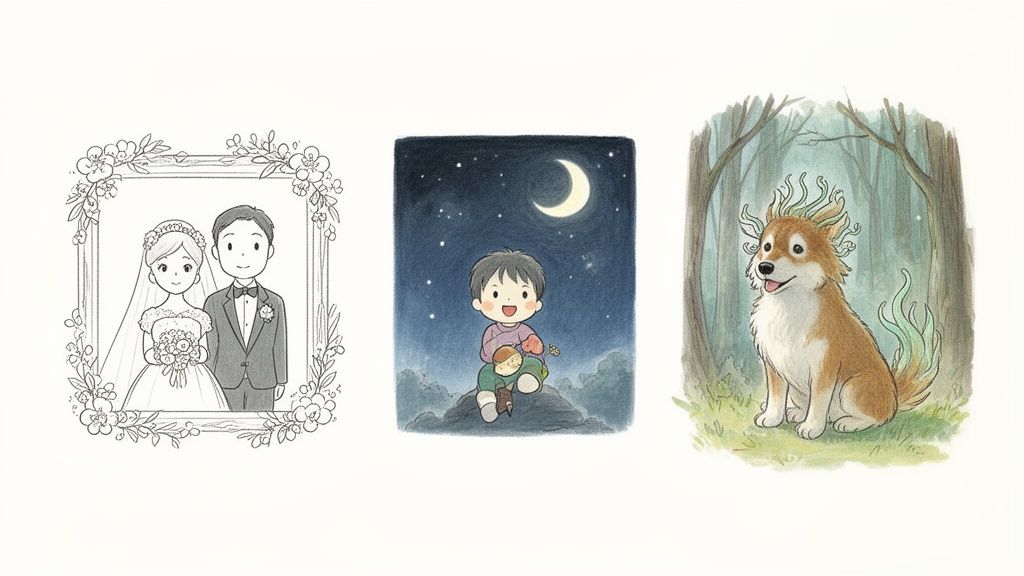
Alright, you've generated a stunning piece of Studio Ghibli AI art. So, what's next? The real magic happens when you move beyond a simple profile picture and start weaving this art into your life.
These images are fantastic for projects that need a deeply personal and unique touch. Picture it: enchanting wedding invitations with a custom portrait of you and your partner, wandering through a hand-painted forest. Once you see your creations as the first step, the possibilities really open up.
Get Inspired with Creative Ideas
Think about using your art to tell a story. You could create a custom picture book for your kids, casting them as the heroes of their own magical adventure. Each page could be a new scene generated from a family photo, building a consistent and heartfelt narrative.
Need a few more ideas to get the gears turning?
- Immortalize a Beloved Pet: Turn a snapshot of your furry friend into a whimsical forest spirit or a brave companion on an epic quest. It’s a beautiful way to create a timeless tribute that truly captures their personality.
- Design a Friendly Mascot: Got a small business or a personal brand? A consistent Ghibli-style character can become a wonderfully approachable and memorable mascot for your website or social media.
- Create Personalized Gifts: Imagine printing your art on mugs, posters, or holiday cards. It’s a one-of-a-kind gift that shows you put real thought and creativity into it.
The real goal here is to sprinkle a little of that Ghibli charm and warmth into everyday things. Each piece becomes a small dose of personal magic, making ordinary moments feel special and shareable with the people you care about.
And you don't have to stop at static images. You can take these portraits and animate them, creating charming little videos perfect for social media stories or digital greeting cards. If you're ready to take that next step, you can learn more about how to create AI videos and bring your characters to life.
Got Questions About Ghibli AI? We've Got Answers.
Jumping into the world of Studio Ghibli AI can feel a bit confusing at first. It's a new space, and naturally, you've probably got some questions. Let's clear up a couple of the most common ones we hear from creators like you.
Is This an Official Tool from Studio Ghibli?
That’s a great question, and the short answer is no. Studio Ghibli hasn't released or given its stamp of approval to any AI tools.
When people say "Ghibli AI," they're really talking about AI models—like the one that powers Tooncraft—that have been expertly trained to recreate that beautiful, hand-painted aesthetic we all know and love. It's a movement born from a deep appreciation for the art, brought to life by modern technology.
Can I Use the Art I Create for My Business?
This is where things get a little tricky, but the answer is mostly yes! The legal landscape here is still evolving, but here’s the general rule of thumb: artistic styles themselves can't be copyrighted, but specific characters (like Totoro or Kiki) absolutely are.
So, if you create an image of a trademarked character and try to sell it, you're stepping into copyright infringement territory. However, using that iconic Ghibli feel to create something completely new? That’s a different story. Turning a photo of yourself into a portrait or designing a unique mascot for your brand in that style is generally seen as fair game. It's a fantastic—and ethical—way to use these tools.
The secret is to focus on originality. As long as you're creating fresh scenes and subjects (like transforming your own photos), you're using the AI for what it does best: sparking creativity, not just copying.
Feeling inspired to create your own enchanting art? Tooncraft makes it incredibly simple to turn your photos and ideas into Ghibli-style masterpieces in just a few clicks. Give it a try and see what you can create