
How to Make a Caricature from a Photo with AI
Learn how to make a caricature from a photo using powerful AI tools. This friendly guide walks you through creating fun, cartoon-style portraits in minutes.
Want to make a caricature from a photo? With the right AI tools, you can skip the art classes and jump straight to creating expressive, stylized cartoons in just a few minutes. This isn't about slapping on a simple filter; it's a completely new way to create fun, personalized art for gifts, social media, or even your brand.
How AI Makes Caricatures Easy
Ever seen those hilarious cartoon versions of people and wondered how they're made? Welcome to the world of AI caricatures, where you can turn any photo you have into a unique piece of art. Forget what you think you know about old-school photo filters—this technology gives you genuine creative control.
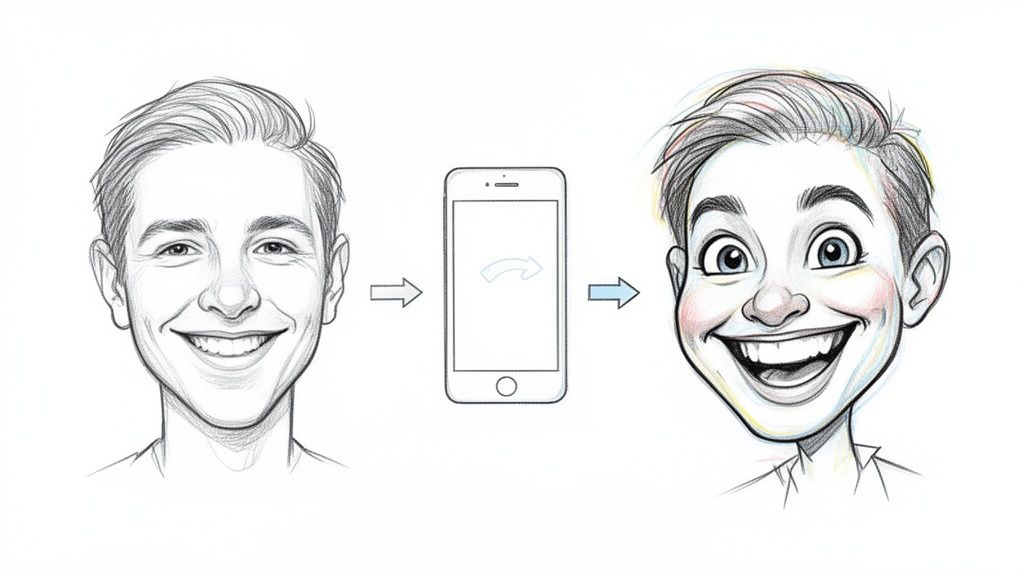
Turning photos into cartoons has been around for a while, but AI blew the doors wide open for everyone. The cartoon photo trend absolutely exploded on social media, hitting a Google Trends score of 5 right when new AI updates let people turn their selfies into incredible Ghibli-style art almost instantly.
This was more than just a passing fad. Downloads for apps like ToonMe shot up by an incredible 221%, and ToonApp saw a 59% jump, all thanks to people sharing their creations on TikTok and Instagram.
Beyond Simple Filters to Real Creative Tools
In the beginning, most apps were pretty basic—just one-click effects. Now, platforms like Tooncraft give you a whole suite of powerful tools, turning anyone into an artist. You’re not just picking a preset look anymore; you’re guiding the AI to create something that actually captures a person's unique vibe and style.
The applications are practically endless, too.
- For Yourself: Create a social media avatar that nobody else has or design awesome, one-of-a-kind gifts for your friends.
- For Family: Make custom holiday cards that will have everyone talking, or even fun, framed portraits for the living room.
- For Work: If you're a streamer or small business owner, you can develop a memorable mascot or professional headshots that feel more approachable and personal.
Just check out this Tooncraft gallery to see the wild range of styles you can achieve, from near-realistic portraits to over-the-top cartoons. It really shows how one photo can be spun into countless different artistic versions.
The best part is seeing a new version of yourself come to life. Whether you're a gamer who wants to look like an anime hero or a parent making a playful family portrait, the process is surprisingly fun and rewarding. This guide will walk you through exactly how to do it, so you can get fantastic results every single time.
Choosing the Perfect Photo for Your Caricature
The secret to a jaw-dropping caricature isn't some hidden AI trick—it all starts with the photo you feed it. Think of it like this: garbage in, garbage out. If you give the AI a blurry, confusing image, you'll get a muddled, generic-looking caricature back. The key to making a caricature from a photo that actually looks like you is to start with a great source image.
First things first, quality is everything. You absolutely need a high-resolution photo. When an image is blurry or pixelated, the AI is forced to guess what your features look like, and its guesses usually aren't very good. Grab a photo that’s sharp, clear, and in focus.
The best shots are almost always simple headshots or portraits from the chest up. You want your face to be the star of the show, plain and simple. Skip the photos where you're a tiny speck in a crowd or standing a mile away from the camera; that just confuses the AI about who it's supposed to be drawing.
Lighting and Clarity are Key
Good lighting is your secret weapon. Soft, natural light coming from the front is perfect because it shows off your features without casting weird, harsh shadows. Photos from dimly lit rooms or with a bright light source behind you will hide the very details the AI needs to create a great caricature.
The background matters, too. A busy, cluttered background is a huge distraction and competes with your face for attention. A plain, neutral background is always your best bet because it gives the AI a clean canvas to work from.
A great rule of thumb? If the photo is good enough for your LinkedIn profile, it’s probably perfect for a caricature. Those shots are usually well-lit, forward-facing, and clearly show your expression—exactly what we need.
What to Avoid When Selecting Your Photo
To save yourself a lot of frustration, try to steer clear of these common photo mistakes. They can really trip up the AI and lead to some disappointing results.
- Sunglasses and hats are a no-go: Anything that covers up your eyes, hair, or forehead hides the features that make you recognizable. The AI needs to see your whole face.
- Ditch the extreme angles: A photo looking straight at the camera or with a slight, natural head tilt works best. Super high or low angles distort your features before the AI even gets started.
- Skip the filtered photos: Heavy Instagram or Snapchat filters mess with your facial structure and skin tone. You want to start with a clean, unedited photo for the most authentic result.
Don't forget about your expression! A genuine smile, a funny smirk, or even a pensive look gives the AI so much more personality to play with. If you want to tweak the emotion later, you can always learn how to change facial expressions with AI once your caricature is generated.
Ultimately, by taking a minute to pick a strong, clear photo, you're setting yourself up for a fantastic final caricature.
Alright, let's jump into the fun stuff—actually making your caricature. Using a tool like Tooncraft feels less like a technical process and more like playing around in a digital art studio. It’s surprisingly intuitive, and once you get the feel for it, you'll probably find yourself trying out every photo you can find.
First things first, you need to upload your photo. As we talked about earlier, a clear, well-lit headshot is going to give you the best results, hands down. The better the AI can "see" the person's features, the more of their unique personality it can bake into the final caricature. Just drag and drop your file or find it on your device to kick things off.
This little infographic nails the three most important things to remember.
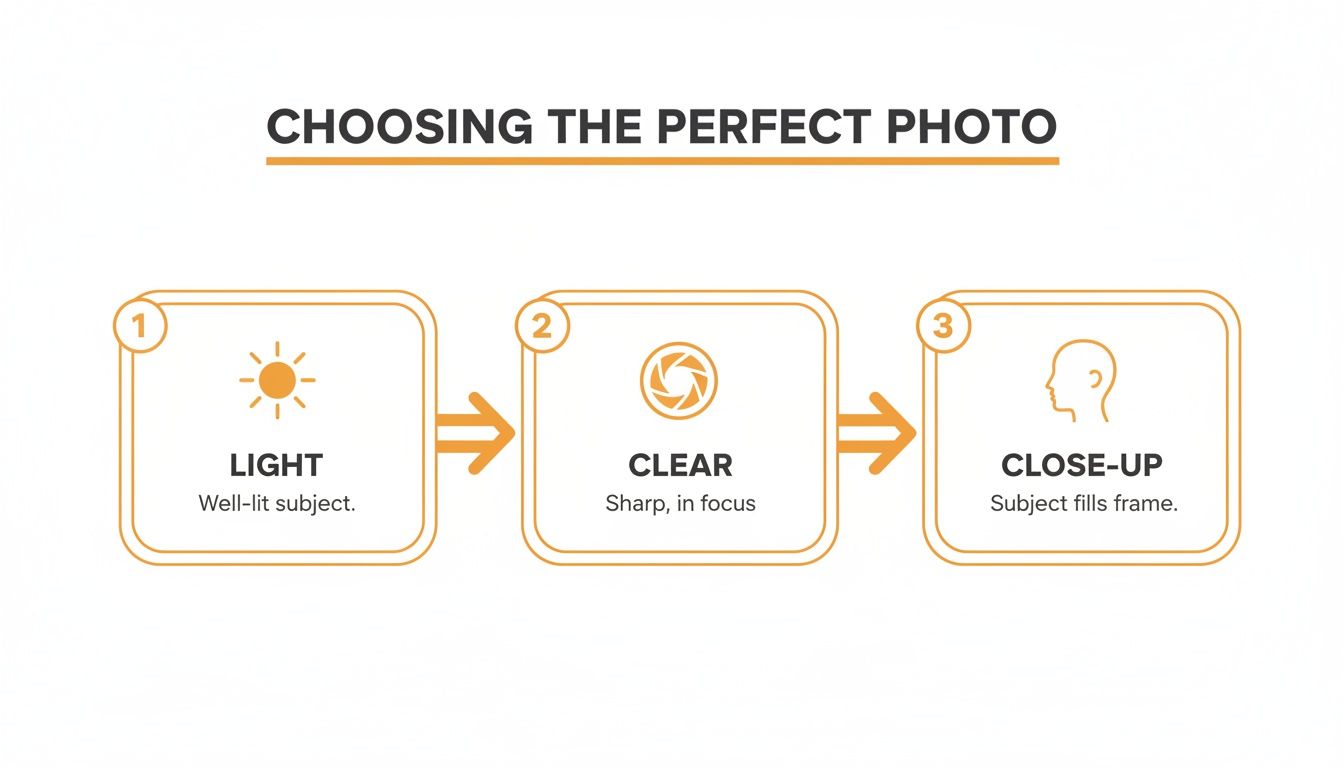
Honestly, if you just focus on those three principles—good light, sharp focus, and a close-up shot—you're already halfway to a great-looking caricature.
Picking the Perfect Style
Once your photo is in, you’ll see a whole gallery of art styles. This is where you really start to define the vibe of the final image. Don't just click the first one that looks cool; take a moment and think about the person in the photo. What style fits them?
For example, I recently turned a photo of my friend from a comic convention into a caricature. A bold, punchy style like ‘Attack on Titan’ or ‘Dragon Ball Z’ was the perfect match for his costume. But for a sweet family portrait, I'd lean toward something much softer, like a ‘Pixar’ or ‘Ghibli-inspired’ look. It’s all about matching the art to the subject.
Most tools, including Tooncraft, give you a live preview so you can see a thumbnail of how your photo looks in each style. I always recommend clicking through a few different options before you decide. It’s a huge help for visualizing the end result.
Tweaking the Details
After you've locked in a style, you get to the fine-tuning stage. This is your chance to add that extra layer of personality. The specific controls can differ between tools, but you’ll almost always find some way to adjust the level of exaggeration.
Think of the exaggeration slider as your comedy dial. A low setting gives you a more subtle, stylized portrait. But cranking it up will really push those distinct features—a big smile, expressive eyebrows—for that classic, over-the-top caricature look we all know and love.
This is the step where you truly make a caricature from a photo that feels unique. Some platforms even let you tweak expressions or add little themed details. My advice? Play around. Don’t be afraid to generate a few versions. Sometimes the first attempt is good, but the third one is perfect. A little experimentation is what turns a simple cartoon filter into a piece of custom art.
Alright, you’ve got your photo prepped and uploaded. Now comes the fun part—giving it a personality. This isn't just about slapping a filter on; it's about choosing an art style that genuinely matches the person in the picture and tells a bit of a story. This is the moment you truly start to make a caricature from a photo that feels like it was made just for them.
AI tools like Tooncraft have an incredible closet of styles to try on. You can go for the high-contrast drama of a classic anime or the soft, friendly look you'd see in American animation. Each choice brings a different vibe. Got a picture of your friend in an awesome cosplay? A bold ‘Naruto’ or ‘Dragon Ball Z’ style would be a perfect match. A sweet family photo, on the other hand, might look incredible with a gentle, Ghibli-inspired touch.
The sheer variety is wild, and it's all thanks to how fast image-to-image technology has been evolving. Just look at the AI anime generator market—it was valued at USD 91.38 billion and is expected to hit USD 384.40 billion by 2030. That explosion shows just how much people love turning their photos into expressive art without needing to be an artist themselves. You can find more details on this growth in recent industry research.
Matching the Style to the Subject
Here’s the thing: not every style is going to click with every photo. The goal is to find a look that complements the original image instead of clashing with it.
- For High-Energy Shots: If your photo is full of action or has someone with a huge, goofy smile, go for a dynamic style. Think bold lines, bright colors, and the kind of exaggerated expressions you see in comic books or action anime. These styles will crank that energy up to eleven.
- For Softer, Posed Portraits: A calm, smiling portrait is the perfect canvas for something more painterly or a gentle cartoon look. Pixar-esque styles are great here, as they bring out warmth and personality without over-the-top drama.
- For Nostalgic or Themed Pictures: Did you find a photo from a retro-themed party? Try a style that looks like a vintage cartoon to really sell the vibe. The right style can make it feel like you’ve time-traveled.
The best caricatures are the ones where the art style and the person in the photo just fit. Don't be afraid to click around and try a few things. Sometimes the most unexpected style ends up being the perfect choice.
Choosing Your Perfect Caricature Style
To make it even easier, here’s a quick guide to help you pick the right Tooncraft style for your project.
| Style Category | Best For | Key Characteristics | Example Use Case |
|---|---|---|---|
| Classic Anime | Action shots, cosplay, expressive portraits | Sharp lines, dramatic shading, vibrant colors | Turning a photo from a comic convention into an art piece. |
| American Cartoon | Family photos, friendly portraits, group shots | Soft, rounded features, warm lighting, approachable | Creating a fun, animated avatar for social media. |
| Ghibli-Inspired | Outdoor scenes, peaceful moments, couple photos | Painterly textures, gentle colors, whimsical feel | A sweet, artistic caricature for an anniversary gift. |
| Vintage Comic | Themed parties, nostalgic photos, humorous shots | Bold outlines, dot shading (Ben-Day dots), retro palette | A quirky poster for a friend's birthday party. |
This table is just a starting point, of course. The real magic happens when you experiment and see what feels right for your photo.
Dialing in the Exaggeration
Once you’ve landed on a style, it's time to play with the exaggeration. This is what puts the "caricature" in caricature. Most tools will have a slider that lets you control how much the features get amplified. A low setting will give you a tasteful, stylized portrait, while cranking it up delivers that classic, over-the-top cartoon look we all know and love.
Take a look at the most prominent features in your photo. Does the person have an infectious grin? Big, expressive eyes? A really unique chin? Pushing the exaggeration slider up will make those features the star of the show, adding that perfect touch of fun and personality. To get a better sense of how this works under the hood, check out our guide on the magic behind AI style transfer.
Ultimately, finding that perfect style is all about playing around. Generate a few options, mess with the settings, and see what you connect with. A little bit of experimentation is all it takes to turn a simple photo into a one-of-a-kind piece of art.
So, What Can You Do With Your New Caricature?
Alright, you've gone through the steps and now you have a fantastic caricature staring back at you from your screen. The big question is: what now? Don't let that masterpiece get lost in your camera roll! This isn't just a funny picture; it's a super versatile piece of art you can use in all sorts of cool ways.
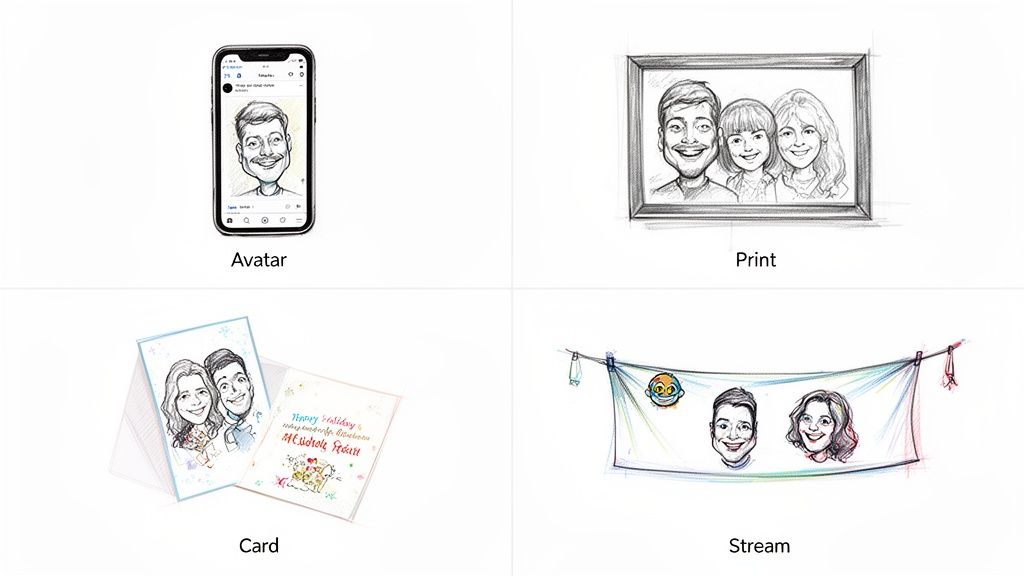
Let's think beyond just swapping out your profile picture. Imagine your caricature as a unique branding tool, a gift that nobody else could give, or a fun way to mark a special occasion. Once you start thinking that way, the possibilities really open up.
For Personal and Family Fun
One of my favorite ways to use caricatures is for gifts and family keepsakes. A personalized caricature has so much more heart and personality than something you can just grab off a shelf. People really notice that extra touch of thought and creativity.
- Holiday Cards That Stand Out: Picture your family as a quirky cartoon crew on this year's Christmas card. It's guaranteed to get a prime spot on the fridge.
- A Fun Twist on Family Portraits: Create a gallery wall with framed caricatures of everyone. It's a playful way to capture each person's unique spirit.
- Gifts That Get a Laugh: Print your caricature on a mug for a coworker, a t-shirt for your best friend's birthday, or a phone case for a family member. It’s a gift that’s both personal and fun.
This kind of custom art is also perfect for big events. For instance, you can design unique and memorable engagement card invites that show off your fun side and get everyone excited for the celebration.
Branding for Creators and Businesses
If you're a content creator, streamer, or running a small business, a caricature can be a secret weapon for your brand. It gives your business a friendly, human face, helping you cut through the noise and build a real connection with your audience.
Here are a few ways I've seen it work wonders:
- Cohesive Channel Branding: Use it across your YouTube banner, Twitch profile, and podcast cover. Suddenly, everything looks connected and instantly recognizable.
- Custom Emotes and Stickers: Imagine your followers using emotes of your animated face during a stream. It builds a tight-knit community feel.
- Approachable Team Headshots: Ditch the stuffy corporate photos on your website's "About Us" page. Friendly caricatures make your team seem much more relatable.
A strong visual identity is everything. A caricature or a custom avatar makes your content instantly recognizable, whether someone is scrolling through their social feed or browsing video thumbnails. It’s your unique stamp.
Even the corporate world is getting in on this. The market for AI tools that turn photos into cartoons is projected to grow by USD 275.77 million, largely because companies can create on-brand artwork about 50% faster than traditional methods. For influencers, viral trends have pushed app downloads up by a massive 221%. With Tooncraft's 50+ styles and watermark-free downloads, it's a solid choice for anyone looking to build a professional-looking brand. You can dig into more of these stats in this deep dive on the booming AI comic generator industry.
Got Questions About AI Caricatures? We've Got Answers
Jumping into AI art is a blast, but it's totally normal to have a few questions before you make a caricature from a photo. You're not the only one! Let's clear up some of the most common things people wonder about so you can get started without any guesswork.
The Nitty-Gritty: Rights, Resolution, and Results
One of the first things people ask is, "Who owns the image?" It's a great question. When you upload a photo to a service like Tooncraft, you still own your original picture, period. The new caricature is yours to use for personal projects, social media, or whatever you dream up, especially when you get a clean, watermark-free download.
Another big one: "Does the quality of my photo really matter?" In a word, yes. Think of it this way—a high-resolution photo gives the AI more pixels and details to play with. This leads to a much sharper, more recognizable caricature. If you feed it a blurry or tiny image, the AI has to guess, and you’ll likely end up with a muddy result that loses the person's likeness. Always start with the clearest photo you can find.
Making the Magic Happen: Getting the Vibe Just Right
"How do I get the AI to capture someone's personality?" This is where the fun really starts. The AI is incredibly clever, but it can't read minds. The secret is to give it a head start with a photo that already screams personality. A picture of your friend in the middle of a huge, genuine laugh is going to produce a far more joyful caricature than a stiff passport photo.
Your source photo is the foundation for everything. The expression, lighting, and clarity of the original image directly shape the personality and quality of the final caricature. A great photo does 90% of the work for you.
What about some of the more specific "what ifs"? I hear these all the time:
- Can I use a group photo? You can, but for the best results, I'd recommend processing each person individually. This gives you way more control over each caricature and ensures the AI focuses perfectly on one face at a time. You can always stitch them together later!
- What if it doesn't quite look like them? No sweat—just try again! Sometimes the smallest change, like using a different photo with better lighting or picking another art style, makes all the difference. Don't be afraid to experiment a little.
- Can I edit the caricature after it’s made? Most AI tools give you the final image as-is. For any major tweaks or additions, your best bet is to export the caricature and pop it into your favorite photo editing software for some manual touch-ups.
Thinking about these points ahead of time sets you up for success. It’s less about pushing a magic button and more about a creative back-and-forth between you and the technology. Give the AI a great photo to work with, and it will give you something amazing back.
Ready to give it a shot? Tooncraft makes it easy to transform any photo into a work of art with over 50 unique styles. Create your first caricature now!