
Your Guide to Creating the Perfect AI Waifu in Tooncraft
Ready to design your own AI waifu? Our friendly guide shows you how to use Tooncraft to create a stunning custom anime avatar that truly represents you.
So, what exactly is an AI waifu? Think of it as your own custom-designed, anime-style character, brought to life with a little help from artificial intelligence. It's your digital companion, your unique avatar, your very own creation.
This lets anime fans move past just watching their favorite characters and step into the creator's seat. You get to design a digital identity from the ground up, perfect for social media, your streaming channel, or any creative project you can dream up.
The AI Waifu Phenomenon is Exploding
Welcome to the wild, creative world of digital companions! The idea of having an AI waifu has officially broken out of niche internet corners and hit the mainstream. It’s a perfect storm, really—AI technology is getting scarily good, and the global love for anime has never been bigger. This isn't just about making a single cute picture; it’s a whole new way to express yourself online.
The magic is in how personal it is. For a lot of people, it's about building a digital version of themselves that captures their vibe, their interests, or even their personal brand. This trend has really taken off with a few key groups:
- Content Creators and Streamers: An AI waifu gives you a super consistent and memorable persona. It’s an amazing way to build a real connection with your audience.
- Anime Fans and Artists: It’s an incredible tool for designing original characters (OCs) or just seeing what you’d look like in the art style of your favorite show.
- Social Media Users: Let's be real, a custom AI avatar totally stands out on a cluttered timeline. It's a fun and unique way to interact with your friends and followers.
This whole creative boom is directly linked to the anime market, which is on an absolute tear. The global anime industry is expected to jump from USD 29.97 billion in 2026 to a mind-blowing USD 49.6 billion by 2031. Those numbers show just how deeply people connect with this art form, and now they're hungry to be part of the culture, not just spectators. If you're a numbers person, you can see the full breakdown in the global anime market forecast.
From Fan to Creator with Tooncraft
This is where tools like Tooncraft come in. They’ve put the power of character creation into everyone's hands. You don't need to be a pro artist with a fancy drawing tablet anymore. The process is surprisingly simple: upload some photos, pick a style you love, and let the AI work its magic to build a consistent character model for you.
Just look at the gallery from Tooncraft below. It shows the incredible range and quality you can get, from soft, Ghibli-inspired portraits to dynamic, action-packed scenes.
Notice how each image keeps the same core facial features but adapts them flawlessly to different anime aesthetics? That consistency is the secret sauce. It’s what makes this more than just a random image generator—it’s a true character creation tool that helps you build a digital persona that is unmistakably you.
Getting Your Photos Ready for the Best Results
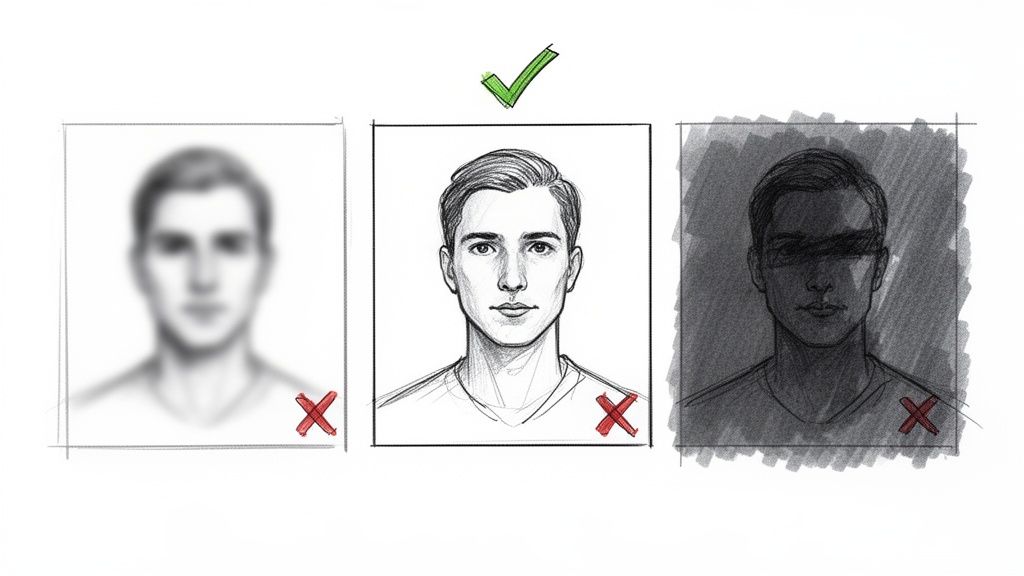
The secret to a stunning AI waifu all comes down to your photos. Seriously. Think of it like this: you're giving the AI the best possible ingredients to cook with. The quality of what you put in directly impacts how amazing your final character looks. A great set of source images is the single most important step for creating a consistent, high-quality digital persona.
Tooncraft's AI needs to clearly see and learn your unique facial features. We're not talking about just one lucky shot, either. The goal is to provide a small collection of clear, well-lit photos that give the AI a complete 360-degree understanding of you. This foundation is what lets the platform generate a character that truly looks like you across countless styles and poses.
Nail the Basics: Your Photo Checklist
Let's get practical. You'll want to aim for 10-15 high-quality photos to train your character model. This gives the AI plenty of data to understand your features from different angles without getting confused.
Here’s a quick-and-dirty checklist for what makes a photo perfect for this:
- Sharp and Clear: Ditch any blurry or pixelated images. The AI needs crisp details to work its magic.
- Good, Even Lighting: Natural light is your best friend here. If you can, face a window to avoid harsh shadows that can hide your features.
- Face Forward, Mostly: The bulk of your photos should be simple, forward-facing portraits or selfies. Think passport photo, but with a bit more personality!
- Keep Backgrounds Simple: A plain wall or an uncluttered space helps the AI focus on you, not the chaotic bookshelf behind you.
Spending a few minutes on this prep work ensures the AI can accurately map your facial structure. This is the key to maintaining that all-important consistency when you start generating your AI waifu in different anime styles later on.
Common Photo Mistakes to Steer Clear Of
Knowing what not to do is just as important as knowing what to do. Uploading the wrong kinds of photos is the fastest way to get wonky, inconsistent results. It can seriously confuse the AI, leading to a character that just doesn't quite look right.
Key Takeaway: The AI learns from everything in the photo. If your face is partially covered, stuck in a deep shadow, or super far away, the AI might think those are permanent features. This can lead to some... interesting (and undesirable) results.
To get the best possible outcome, make sure you avoid these common pitfalls:
| Bad Photo Type | Why It Causes Problems |
|---|---|
| Group Photos | The AI gets confused and won't know which person to focus on. |
| Heavy Shadows | Can drastically alter the perceived shape of your face. |
| Obscured Face | Sunglasses, hats, or even your hand covering your mouth hides key data. |
| Extreme Angles | Super high or low angles distort your natural features. |
| Photos from Afar | If your face is a tiny part of the image, the AI can't grab enough detail. |
By taking a few extra minutes to select the right images, you're setting yourself up for a much better experience. You'll get an AI waifu that not only looks amazing but also feels genuinely and consistently like your anime counterpart.
Choosing a Style to Match Your Character's Vibe
Alright, you've got your photos prepped and ready to go. Now for the fun part: giving your AI waifu her signature look and feel. This is the moment your character really starts to come alive, moving from an idea in your head to something you can actually see.
Tooncraft has a massive library of styles, and it can be a little overwhelming at first. The best way to start is by thinking about the vibe you're going for.
Are you picturing someone intense and powerful, like a character straight out of an action-packed shonen series? Or is she more on the whimsical and gentle side, with that soft, painterly aesthetic you'd find in a Ghibli film? Each style brings a completely different energy, and your choice here really sets the tone for everything else.
Training Your Unique Character Model
This is where the real magic happens. You’re not just slapping a filter on a photo. You’re actually building a foundational character model. When you upload your 10-15 curated photos, you’re teaching the AI to understand and recreate your specific facial features, consistently.
It’s this deep training process that makes a tool like Tooncraft so powerful. The AI learns the unique shape of your eyes, the exact curve of your smile, and the underlying structure of your face. This is huge, because it means that no matter what expression you generate—happy, sad, surprised, or angry—the character will always look like you.
Here’s just a small peek at the style library you can play with in Tooncraft.
As you can see, the options are incredibly diverse. You’ve got everything from sharp, cel-shaded action styles to more muted, painterly fantasy looks. Finding the one that clicks with your vision is what this step is all about.
Tooncraft Anime Style Guide
To give you a head start, I've put together a quick guide comparing some of the most popular anime styles on the platform. Think of this as a cheat sheet to help you translate a personality into a visual aesthetic.
| Anime Style | Key Characteristics | Best For Creating Vibe |
|---|---|---|
| Shonen Action | Bold lines, dynamic shading, intense expressions. | Powerful, determined, and ready for adventure. |
| Ghibli-Inspired | Soft colors, rounded features, painterly backgrounds. | Whimsical, gentle, and heartwarming. |
| Modern Slice of Life | Clean lines, bright palettes, relatable designs. | Friendly, approachable, and contemporary. |
| Dark Fantasy | High contrast, detailed textures, dramatic lighting. | Mysterious, elegant, and a little dangerous. |
Choosing the right style will help your AI waifu feel authentic and connect with the specific vibe you're trying to create. Each one tells a different story.
This whole world of AI and anime is exploding right now, and it’s not just a niche trend. With the boom in global streaming and gaming, the appetite for anime is bigger than ever. It's estimated that there will be 4.2 billion streaming hours of anime consumed in 2025, which is a massive 28% increase from 2024. In fact, platforms like Netflix have reported that anime makes up around 20% of their most-watched content in key markets.
Pro Tip: Don't be afraid to experiment! The beauty of a trained character model is its versatility. You can generate your AI waifu in a few different styles to see which one really captures her personality before you settle on a final look.
Ultimately, this is a creative choice that breathes life into your character. Once you've trained your model, you'll have a consistent, recognizable digital persona that you can take anywhere.
If you want to see what's possible, I highly recommend checking out our gallery of AI waifu creations for a dose of inspiration. Getting this foundation right is critical, because next up, we’ll start building out a whole library of poses and expressions.
Mastering Image and Video Generation
Alright, the heavy lifting is done. You've trained your character model and locked in a style you love. Now comes the really fun part: bringing your AI waifu to life. This is where we go beyond a single, static portrait and start building a full visual library that shows off her personality.
Think like a character designer for a moment. What does she look like when she’s happy, deep in thought, or maybe a little mischievous? Creating that emotional range is what will make your character feel like a real person someone can connect with.
The core process is surprisingly simple, especially since you’ve already handled the photo prep and style selection. From here on out, it’s all about creative generation.
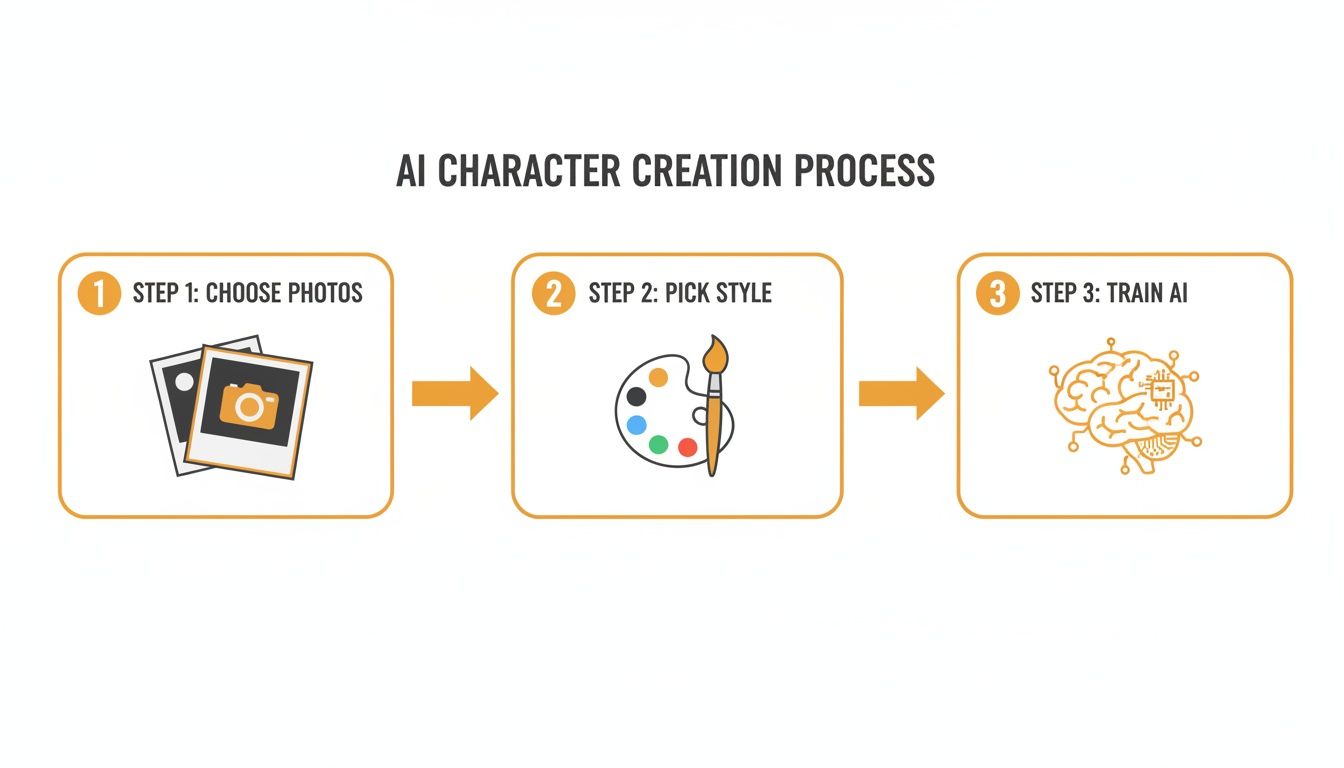
This simple flow is the blueprint for every amazing image and video you’ll make.
Efficiently Build a Visual Library with Batch Generation
Generating images one by one is okay when you're just testing things out, but if you want to build a serious collection of poses and expressions, you need to be smart about it. This is where batch generation becomes your secret weapon. It lets you create a whole bunch of images at once from a single idea, saving you an incredible amount of time.
For example, instead of just prompting for a "smile," you can use batch generation to explore all the different kinds of smiles your character might have:
- A soft, gentle smile
- A big, joyful laugh
- A sly, knowing smirk
- A shy, blushing smile
Using this method, you can quickly flesh out your character’s emotional library with subtle, nuanced expressions. You can knock out dozens of high-quality images in the time it would normally take to create just a handful. It’s the perfect way to build up a backlog of content for a social media profile so you always have something fresh to post.
Bringing Your AI Waifu to Life with Video
Static images are the foundation, but short video clips are what really add that spark of life. Think about animated profile pictures on platforms like Discord or Twitch, or those eye-catching social media stories. Tooncraft makes turning your character into simple, animated sequences a breeze.
My Pro Tip: The secret to a great video clip is a fantastic starting image. Always generate a high-quality portrait with a really clear expression first. That image becomes the anchor for the animation, and the AI will then add subtle movements like blinking, breathing, or a slight turn of the head to make it feel alive.
Imagine a short, looping video of your waifu winking or giving a little wave. These small animations make the character feel so much more present and interactive. If you want to get into the nitty-gritty, we have a complete guide on how to create AI videos with just a few clicks. The possibilities are huge for creating content that truly connects with people.
Showing Off Your New AI Waifu
Alright, you've done the hard work and brought your amazing AI waifu to life. Now for the fun part: showing her off! This is more than just having a cool picture; it's about making your unique creation a part of your online identity, personal brand, or just a fun project.
The possibilities really are endless. A great avatar can become the face of your online world, a character your followers recognize instantly, or just a new way to express yourself. Let's get into some of the best ways to introduce her to everyone.
Getting the Look Right for Every Platform
You wouldn't wear the same outfit to a formal dinner and a beach party, right? The same goes for your avatar. A picture that’s perfect for Twitch might get weirdly cropped on Instagram. Thinking about where she'll be seen is the key to making sure she always looks incredible.
- Social Media Avatars: For places like Twitter, Discord, and Twitch, you'll want a sharp, clean headshot. The focus needs to be on her face and expression, since it's going to be squeezed into a tiny circle most of the time.
- Instagram & Content Feeds: This is where you can let loose with those full-body poses and more detailed scenes. Use the library of images you generated to create a consistent, eye-catching feed that really builds out her personality.
- Streaming Overlays: If you're a streamer, a consistent AI persona is a massive branding win. Create a set of expressions—happy, surprised, focused—that you can pop into your overlays to react to gameplay or what's happening in chat.
Keeping her look consistent across platforms helps build a real connection with your audience. They're not just following a random account; they're getting to know your character.
More Than Just a Profile Pic
Your AI waifu isn't just for social media. She can be the star of all sorts of creative and personal projects, adding a unique anime touch to your life.
Imagine sending out custom holiday cards that nobody will ever forget. Or, what about designing a one-of-a-kind "couple portrait" that captures your relationship in a super cute, animated style? You could even turn your pet into an adorable anime sidekick to join her on adventures!
The idea of having a unique digital identity is really taking off. In Japan and the US, where 70% of waifu enthusiasts live, AI companion apps are seeing 2x growth. This trend is helping businesses create memorable mascots and letting couples make charming cartoon pictures together. If you want to go deeper on this, you can discover more insights about the AI avatar market.
At the end of the day, your AI waifu is a blank canvas for your creativity. Whether you're building a brand, connecting with an audience, or just having a good time, she's a fantastic new way to let your imagination run wild.
Got Questions About Creating Your AI Waifu? Let's Dive In.
Jumping into AI character creation for the first time usually sparks a few questions. From the nitty-gritty technical details to the bigger creative picture, getting solid answers is key to having a great experience. I've pulled together some of the most common questions we hear to help you get started on the right foot.
The big one is always about photos. We suggest using 10-15 high-quality images, but what really matters is variety and clarity. You're essentially giving the AI a complete 360-degree reference of your features so it can build a model that looks consistently like you.
People also wonder about flexibility. What if you train a model and then want to try a different art style? Go for it! That’s one of the best parts. Once your personal model is built, you can drop her into any of Tooncraft's styles—from Shonen Action to Ghibli-Inspired—without ever needing to upload your photos again.
How Credits and Ownership Work
We built the credit system to be straightforward. You just buy a pack of credits, and they're yours forever—they never expire. You then use these credits to generate your images and videos.
It’s a simple pay-as-you-go system. Creating a single image might cost one credit, while a short video clip will be a bit more. There are no surprise monthly subscriptions; you only pay for what you actually create.
Then there's the ownership question, which is super important. When you make an AI waifu on Tooncraft, you own the images and videos you generate. That means you’re free to use them however you want—for social media profiles, streaming assets, or just for fun. It’s all yours.
A Little Insider Tip: Many people find themselves really connecting with their AI creations. They give them names, create backstories, and build out entire personalities. It quickly becomes more than just making a picture; it's about bringing a digital companion to life.
Your Privacy and Our Content Rules
Your privacy is paramount. The photos you upload are only used to train your personal AI character model. That’s it. They aren’t used for anything else, they are never shared, and they're handled with tight security. This should be a fun and worry-free process, from start to finish.
We're also serious about keeping Tooncraft a safe and positive space for creativity. All generated content gets reviewed to make sure it follows our community standards. If you want the full breakdown of the do's and don'ts, you can find everything in our official AI video moderation guidelines over on the blog.
Ready to create a character that’s uniquely yours? With Tooncraft, you can turn a handful of photos into an amazing, fully-realized AI waifu in just minutes. Start creating for free today!