
Convert Image to Cartoon Free and Bring Your Photos to Life
Discover how to convert image to cartoon free with top AI tools. Learn expert tips for creating stunning, personalized cartoon avatars from your photos.
Tired of complicated software? Good news: you can convert an image to a cartoon for free in seconds, right from your web browser. Dozens of AI tools are out there, ready to transform your photos with just a few clicks.
Forget steep learning curves. We're talking about uploading a picture, picking a style you like—whether it’s anime, 3D comics, or something else entirely—and hitting download. It’s that simple.
Your Quick Guide to Free Image to Cartoon Converters
So, you're ready to jump in and turn a favorite photo into a cartoon without opening your wallet. Let's look at the simple, web-based tools that get the job done fast. These are perfect for whipping up a new profile picture, making a social media post that stands out, or just having a little fun.
The recent explosion of free AI cartoon generators means you have some seriously good options. Tools like CapCut Web and Fotor are fan favorites for a reason—they offer one-tap transformations and are often up to 10x faster than trying to do it yourself in Photoshop. From a classic Simpsons look to a polished 3D animation style, you can find a vibe that fits.
Top Tools for Instant Results
When you need to convert an image to a cartoon for free, you want it to be quick and painless. That’s exactly what these platforms are built for. You upload, you click, and you’re done.
Most of these sites greet you with a super simple interface, often showing a "before and after" to give you an idea of what’s possible.
See? No clutter. It’s designed to get you straight to the fun part without requiring a sign-up or messing with confusing settings.
What really makes these tools shine is their focus. Need a cool anime avatar for your Twitch stream? Or a playful cartoon version of your family for a holiday card? There’s an AI style out there that’s a perfect match.
The best free tools go beyond just slapping a filter on your photo. They use AI to genuinely reinterpret your face, expression, and even the background to create a cartoon that looks and feels authentic.
Now, let's take a closer look at a few of my top picks. I'll break down what makes each one stand out, from the variety of art styles to how easy it is to use, so you can go from photo to cartoon in no time.
Top Free Cartoon Converters at a Glance
Choosing the right tool can feel overwhelming when there are so many options. This quick comparison table breaks down some of the best free converters to help you decide which one is right for your project.
| Tool Name | Best For | Key Feature | Limitations |
|---|---|---|---|
| CapCut Web | Quick social media edits & anime styles | Integrated video editor and trending effects | Requires a free account for some features |
| Fotor | Variety of artistic styles | Dozens of cartoon and sketch effects | Free version has watermarks and lower resolution |
| ToonMe | Detailed and caricature-like portraits | Unique, hand-drawn-style AI models | Mobile-focused; web version can be limited |
| VanceAI Toon-er | High-quality 3D and anime renders | Multiple AI models for different looks | Free use is limited to a few credits |
Ultimately, the "best" tool really depends on what you're trying to create. For a quick and fun profile picture, any of these will do the trick. For something more specific, it’s worth trying a couple to see which style you like most.
Finding the Perfect Free Cartoonizer for Your Style
With so many free tools out there, how do you pick the one that will actually nail the look you’re going for? The secret isn't about finding the tool with the most features; it’s about matching the tool to your creative goal.
Think about the final result you want. Are you a Twitch streamer who needs a sharp, eye-catching anime avatar? Or are you trying to create a soft, whimsical, Ghibli-inspired family portrait as a surprise gift? The specific style you're chasing should be your North Star. A tool that’s fantastic for bold, comic-book effects might completely butcher a delicate, painterly look.
Web Tools vs. Mobile Apps
The choice often boils down to convenience versus control. Quick, browser-based platforms are brilliant for one-off projects. You can upload a photo, click a button, and have a cartoon version in under a minute without installing a single thing. They’re the perfect solution when you just need to convert an image to cartoon free and fast.
On the other hand, mobile apps usually pack more creative punch with a wider variety of filters and effects that get updated regularly. Many, like PhotoDirector, give you dozens of cartoon styles and even let you apply effects to specific parts of your picture. The trade-off? You’ll likely run into more ads or stronger pushes to subscribe.
This handy flowchart can point you in the right direction, whether you're making a new profile pic or just having some fun.
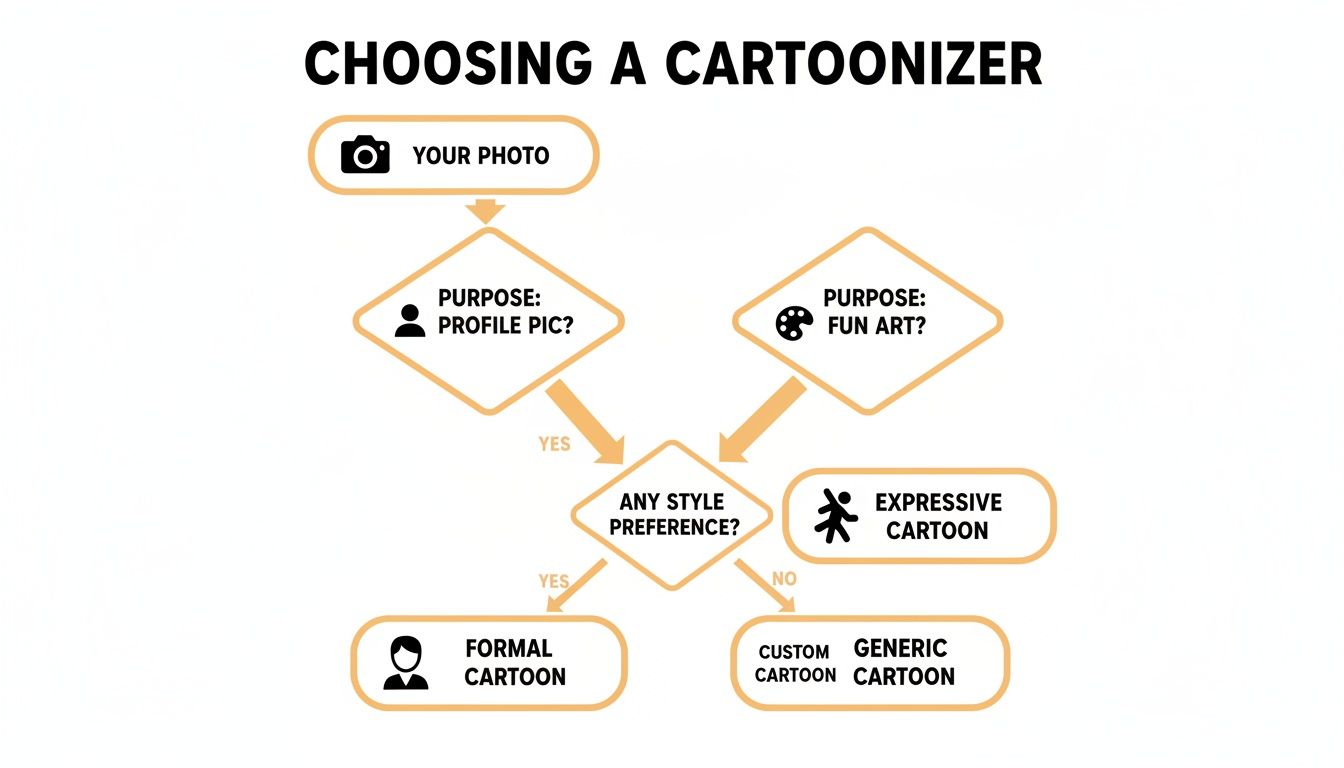
As you can see, what you plan to do with the image—whether it’s for a professional avatar or a quick social media post—should guide your choice of tool and the features you prioritize.
What to Look for in the Fine Print
Before you upload your favorite selfie, it pays to check a few things that aren't always obvious. These little details can make a huge difference.
- Watermarks: A lot of free tools slap their logo on your final image. See if there’s an option to download a clean version, even if it’s a one-time freebie for new users.
- Export Quality: Free services often cap the download resolution. That’s perfectly fine for a small profile picture, but it’s going to look blurry and pixelated if you ever try to print it.
- Data Privacy: This one is a big deal. A trustworthy service will have a clear privacy policy explaining that they don't store or sell your photos. If the terms are vague, it’s best to just move on.
Trust me, there's nothing worse than spending time creating the perfect cartoon image, only to discover it's trapped behind a paywall, covered in a giant watermark, or too low-res to actually use. A quick check up front can save you a world of frustration.
Keeping these factors in mind will help you find a tool that not only fits your artistic vision but also respects your time and privacy. As you start playing around, you might find you want a more unique or consistent look. You can learn more about developing that in our guide to creating distinct cartoon styles that really stand out.
Turning Your Photo Into a Cartoon Masterpiece
Alright, let's get down to actually making something cool. Here’s a little secret I've learned from running thousands of images through these tools: the final result has less to do with the specific AI you choose and everything to do with the photo you start with.
Think of it like this: you're giving an artist a reference photo for a portrait. A clear, well-lit picture where your face is front and center is going to get you a much better painting than a blurry, chaotic group shot from across the room. The same exact principle applies here.
Common Photo Pitfalls to Avoid
Before you even think about uploading a picture, let's talk about setting yourself up for success. I’ve made all these mistakes myself, and trust me, avoiding them will save you a ton of time and frustrating do-overs.
The absolute biggest killer of a good cartoon conversion is low resolution. Feeding a tiny, pixelated image into an AI cartoonizer is pointless. The AI can’t magically invent details that aren't there, so you'll just end up with a blurry, indistinct mess.
Keep an eye out for these other frequent offenders too:
- Harsh Shadows: If you have strong, dark shadows cutting across your face, the AI will get confused. It often interprets them as part of your features, leading to some very strange and distorted results. Soft, even lighting is always your best bet.
- Busy Backgrounds: A cluttered background is distracting. The AI might struggle to separate you from the chaos behind you. A simple wall or a blurred-out background really helps keep the focus where it belongs—on you.
- Obscured Features: Sunglasses, a hat casting a deep shadow over your eyes, or even just a lot of hair covering your face can throw the AI for a loop. Make sure your key features are clearly visible.
Here's the rule of thumb I live by: if a person would have trouble making out the details of your face in the photo, the AI will struggle ten times more. Just pick a photo that looks like a decent headshot, even if it’s a casual selfie.
By taking a moment to choose a quality photo, you've already done most of the heavy lifting. This single step makes a world of difference.
A Universal Workflow for Free Tools
The good news is that while every website and app looks a little different, they almost all follow the same basic process. Once you get this simple workflow down, you can hop between different tools with confidence.
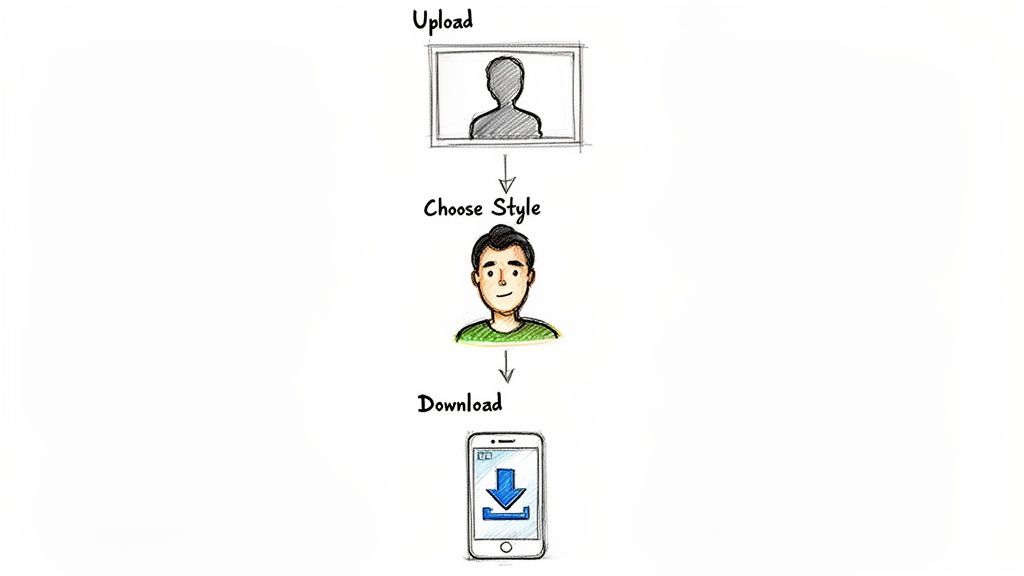
It’s almost always a quick three-stage process: you upload your picture, pick a style you like, and then save the final result. Most tools are designed to get you from start to finish in just a minute or two.
Here’s what that looks like in practice:
- Upload Your Image: First things first, find that big "Upload" or "Get Started" button. Grab that high-quality photo you picked out and get it into the system.
- Browse and Select a Style: Now for the fun part. You'll usually see a gallery of different artistic styles—things like "3D Cartoon," "Anime," "Sketch," or maybe some cool comic book effects. Click around and preview a few to see what looks best.
- Download Your Creation: Found a winner? Great! Just hit the "Download" or "Save" button. Keep an eye out for any options to choose the resolution or if there’s a watermark you need to be aware of.
This simple flow is the backbone of pretty much every free tool out there. If you're looking to push the creative boundaries a bit further, you might want to learn how to create bold pop art comic styles for something truly unique. Getting comfortable with this workflow lets you stop worrying about the technical steps and start focusing on making something awesome.
So, What Can You Actually Do With Your New Cartoon?
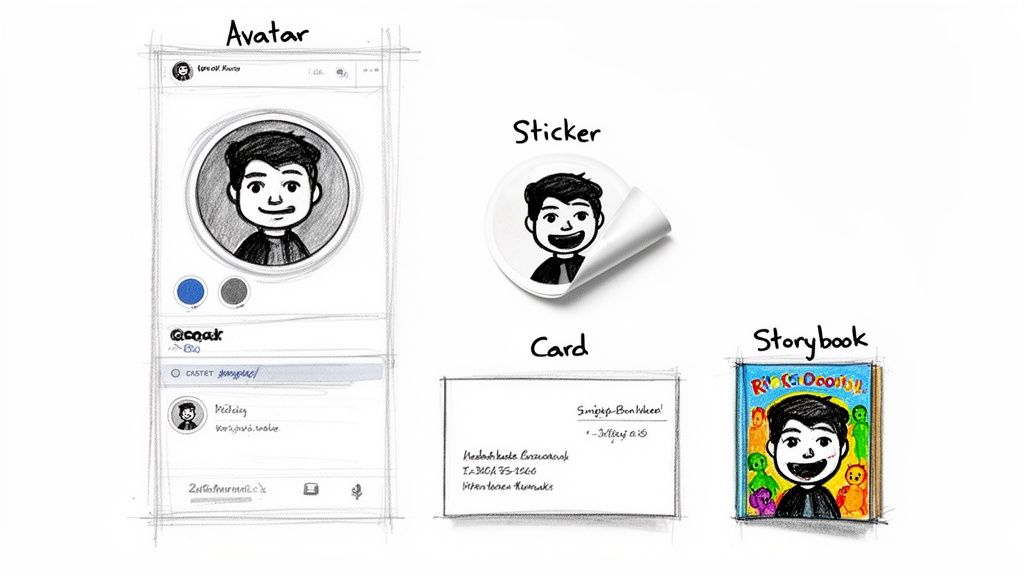
Alright, you've run your photo through a free tool and now you've got this awesome cartoon version of yourself. What's next? This is where the real fun begins. That new image isn't just a fun picture—it's a super versatile asset you can use for branding, creative projects, and just making your online presence a little more you.
Think of it as your unique digital signature. A custom cartoon avatar instantly makes you stand out on a crowded YouTube feed, a busy Twitch stream, or even on a professional site like LinkedIn. It injects a dose of personality that a standard headshot just can't match, making you far more memorable.
Give Your Personal and Professional Brand a Boost
A unique cartoon version of yourself can quickly become the cornerstone of your digital identity. It's recognizable and strikes a great balance between professional and approachable. This is a huge win for content creators, freelancers, and small business owners who want a distinct look without shelling out for a custom illustrator.
Imagine plastering that cool cartoon you across all your channels:
- Social Media Profiles: Using the same avatar on Instagram, X (formerly Twitter), and Facebook creates instant brand recognition.
- Email Signatures: It adds a friendly, human touch to your otherwise professional emails.
- Business Cards: A cartoon mascot or avatar is a fantastic icebreaker and ensures your card doesn't get lost in the pile.
- YouTube Thumbnails: Let's be honest, an eye-catching cartoon character can do wonders for your video's click-through rate.
And this isn't just a hunch—the data backs it up. Posts that feature cartoon-filtered images often get 2.5x more shares. On top of that, Twitch streamers with distinct anime-style avatars have been shown to retain 35% more viewers over the long haul.
This is a game-changer for businesses, too. AI cartoon generators are completely shaking up how marketing content gets made, letting brands create custom mascots and visuals for a tiny fraction of the usual cost. Some brands have reported saving up to 70% on visual assets just by using AI-generated characters instead of pricey stock photos. If you're curious about the bigger picture, a McKinsey report dives deep into how AI is reshaping creative industries.
Get Creative With Your Own Personal Projects
Branding aside, your new cartoon images are perfect for all kinds of personal projects. They add a heartfelt, custom touch that you just can't find in a store. It's amazing what you can create once you convert an image to cartoon free of charge.
Need some inspiration? Here are a few ideas to get the ball rolling:
- Custom Stickers and Magnets: Slap a cartoon you on your laptop, water bottle, or fridge by printing it on sticker or magnet paper.
- Personalized Greeting Cards: Design one-of-a-kind birthday, holiday, or thank-you cards that your friends and family will actually want to keep.
- Unique Gifts: How cool would it be to get a mug, t-shirt, or phone case with a custom cartoon on it? It's a fun and truly personal gift.
- Fun Family Storybooks: Turn your family members into cartoon characters and create a simple, charming storybook for your kids.
And hey, don't leave your furry family members out! Creating stylized portraits of your pets is a fantastic way to capture their goofy personalities. For some great examples, check out our guide on creating adorable cartoon versions of your pets.
Honestly, once you start seeing your cartoon image as a creative building block, the possibilities are pretty much endless.
When Your Project Needs More Than a Free Tool
Free tools are an absolute blast for a quick laugh or a one-off social media post. They’re a fantastic way to dip your toes into the world of AI art without any commitment. But once you start dreaming bigger, you'll pretty quickly bump into the ceiling of what “free” can really do.
You’ve probably been there. You get the perfect cartoon version of your photo, only to see it plastered with a giant, ugly watermark. Or you download your masterpiece and realize it’s a tiny, pixelated file that’s useless for anything bigger than a profile picture. These are the classic growing pains that tell you it’s time to look for something with a bit more horsepower.
Recognizing the Limits of Free Converters
For anyone trying to do serious work, the biggest killer is consistency. Free tools are built for single, throwaway images. They have no memory of what you did five minutes ago, which makes creating a cohesive look for a brand, a comic strip, or even just a series of profile pictures nearly impossible.
You'll also likely run into these all-too-common frustrations:
- Cookie-Cutter Styles: Free platforms often give you a handful of generic styles. Your creation ends up looking just like thousands of others out there.
- No Commercial Rights: This is a big one. Many free tools state that their images are for personal use only, putting you in a tight spot if you want to use them for your business.
- Zero Creative Control: You’re at the mercy of the AI. There are rarely any dials to turn or sliders to adjust, so you can't tweak the details or refine the final look.
At a certain point, the time you waste trying to work around these problems—photoshopping out watermarks or endlessly re-rolling for the right look—is worth more than the cost of a dedicated tool. Your creativity shouldn't be handcuffed by your software.
Stepping Up to a Professional Platform
This is exactly where a dedicated platform like Tooncraft completely changes the game. It was built from the ground up to solve the very problems that drive creators crazy. It’s less of a novelty toy and more of a reliable partner for your important projects.
Moving to a professional tool unlocks features you just won’t find on the free sites. For starters, Tooncraft gives you over 50 unique styles to play with, from popular anime aesthetics to classic cartoon vibes, letting you find a look that’s truly yours. Most importantly, you get high-resolution, watermark-free images that are ready for anything you can throw at them.
But the real secret weapon is character consistency. You can create a whole library of your character in different poses and expressions, and they’ll look exactly the same every single time. This is becoming absolutely crucial as the animation industry embraces AI. In fact, some experts predict that by 2026, up to a third of all long-form animation will be touched by AI, a shift made possible by platforms offering this level of control. You can see more on how AI is transforming animation on YouTube.
When you’re ready to convert image to cartoon free from the usual headaches, making the jump to a pro tool is the smartest move you can make.
Got Questions About Free Cartoon Converters? I've Got Answers
So, you're ready to start turning your photos into cartoons. It's totally normal to have a few questions before you dive in. The world of AI tools can feel a bit like the wild west, but don't worry—I've spent a ton of time in this space and can help clear things up.
Let's tackle some of the most common questions I hear from people just getting started. My goal is to get you creating with confidence, without having to second-guess the process.
Are These Free Tools Actually Safe to Use?
For the most part, yes! The big, well-known online cartoonizers are generally safe. That said, a little common sense goes a long way. Before you upload that family portrait, take a quick peek at the site's privacy policy.
A good service will be upfront about not storing or sharing your images after they're done. I personally steer clear of any site that asks for a bunch of personal info or makes its terms and conditions impossible to find. When in doubt, stick with the tools people are already talking about.
Can I Use the Cartoon Images for My Business?
This is a big one, and the answer is almost always hiding in the fine print. Most free converters are very clear that the images you create are for personal, non-commercial use only.
Thinking of using that new cartoon avatar on your monetized blog, your company's social media, or a t-shirt you plan to sell? You absolutely have to check the usage rights first. Skipping this step can land you in legal hot water. This is honestly one of the biggest reasons to consider a paid tool, as a commercial license is usually part of the deal.
Why Does My Cartoon Look Blurry or Low-Quality?
The quality of your final cartoon is almost entirely dictated by the quality of the photo you start with. It's the classic "garbage in, garbage out" scenario. For the best results, you need a sharp, high-resolution photo with good lighting and a clear subject.
A lot of people think the AI can just invent details that aren't there, but that's not how it works. If your original photo is a blurry mess, the AI has nothing to work with, and you'll get a fuzzy cartoon back.
Also, keep in mind that some blurriness might be by design. Many free services intentionally limit the output resolution to nudge you toward their paid plans for those crisp, HD downloads.
How Can I Get a Cartoon Without a Watermark for Free?
Ah, the million-dollar question! Finding a great, truly free tool that doesn't slap a watermark on your image can feel like a treasure hunt. Watermarks are how these services get their name out there, so they're pretty standard.
That said, you can sometimes get lucky. Some tools offer a free trial or a few watermark-free downloads just for signing up. It's also worth keeping an eye on new apps trying to make a splash—they might offer it as a promo. But if you need consistently clean, professional images, investing in a paid service is the most reliable and least frustrating way to go.
Ready to create stunning, professional-grade cartoons without any of the limitations? Tooncraft offers over 50 unique styles, high-resolution outputs, and consistent character creation for all your projects. Start creating with Tooncraft today!