
Your Guide to Creating Art with an AI Waifu Generator
Discover how an AI waifu generator works. Learn to write perfect prompts, use AI art tools safely, and bring your ideal anime characters to life.
Ever pictured a perfect anime character in your head, down to the last detail, and wished you could just snap your fingers and see them on screen? That's pretty much what an AI waifu generator does. It’s like having a dedicated artist on standby, ready to turn your wildest descriptions into a unique piece of character art.
Welcome to the World of AI Character Creation
At its core, an AI waifu generator is a creative tool that translates your text prompts into visual art. Imagine a digital artist that has spent countless hours studying millions of anime and manga images, internalizing every style, from the shimmer in a character's eyes to the flow of their hair in the wind. You give it the concept, and the AI does the heavy lifting, bringing your vision to life.
This technology isn't just for seasoned artists—far from it. It's built for anyone with a story to tell or an idea to share. Writers can finally put a face to the characters they've been developing for years. Gamers can create totally custom avatars that stand out on their profiles. It’s a fun, collaborative process where you guide the AI, tweak your descriptions, and watch your character evolve in real-time.
Who Benefits from This Technology?
You might be surprised by how many different people are using these tools. The appeal is simple and universal: it gives everyone the power to create, regardless of their drawing skills.
Here’s a quick look at who's jumping in:
- Writers and Storytellers looking for visual inspiration or concept art for their novels and screenplays.
- Gamers and Streamers who want a one-of-a-kind avatar for their Twitch or Discord presence.
- Creative Hobbyists who just love designing original characters and sharing them online.
- Role-Playing Game Enthusiasts creating custom portraits for their D&D or other TTRPG campaigns.
This guide will walk you through exactly how these generators work, so you can start creating characters for your stories, social media, or just for the fun of it.
Think of these tools less like a machine and more like a creative partner. They empower you to express your vision without needing to spend years mastering traditional art skills. It’s all about making art more accessible for everyone.
We'll also touch on related tools like Tooncraft, which offer a slightly different but equally cool approach. Instead of generating a character from scratch with text, services like Tooncraft let you upload your own photos and transform them into anime-style portraits. It’s another great way to play with anime art, letting you see yourself or your friends reimagined in your favorite styles.
How AI Learns to Draw Your Perfect Character
Ever wonder how an ai waifu generator can take a few of your words and spin them into a completely original piece of art? It feels like magic, but what’s happening behind the scenes is even more interesting.
Think of it like an anime artist who has spent their entire life studying millions of images. They’ve poured over every little detail—the exact way to draw expressive eyes, how different hairstyles flow, the specific color palettes that set a mood, and the dynamic poses that make a character pop off the page.
After all that intense training, the artist develops a powerful intuition. You could describe "a cheerful knight with silver hair and glowing blue eyes, standing in a sunlit forest," and they can instantly picture it and start sketching. That’s a pretty good analogy for how these AI models work.
The Digital Apprenticeship
At their heart, these AI tools are generative models. They're "trained" on massive datasets packed with millions of images and the text descriptions that go with them. It's like a digital apprenticeship where the AI slowly learns the intricate connections between words and pictures.
It figures out that the word "cyberpunk" usually comes with neon lights and futuristic cityscapes, while "fantasy" often means castles, magic, and mythical creatures. This huge library of examples teaches the AI the unwritten rules of anime and manga aesthetics. It’s not just copying and pasting; it’s building a genuine understanding of why things look the way they do.
From Noise to a Masterpiece
One of the most popular technologies making this all possible is the diffusion model. The whole process is pretty cool and reminds me of a sculptor carving a statue out of a block of stone.
The AI starts with what looks like a canvas of random TV static—a total mess of pixels. Your text prompt is the sculptor's chisel and guide. The AI then carefully refines this static, step-by-step, chipping away at the randomness to bring out the image you described. It's like watching a blurry picture slowly come into sharp focus, revealing the character you had in your head.
This is why the AI can create something totally new. It's not just mashing together art it’s seen before. It’s using its training to generate a unique piece of art that perfectly matches your instructions.
This core technology is fueling some serious growth. The global AI image generator market was valued at USD 9.10 billion in 2024 and is expected to skyrocket to USD 88.71 billion by 2032. That explosion shows just how much people want these creative tools. You can dig into the numbers and see the full market research on ResearchAndMarkets.com.
This simple flowchart breaks down the journey from your idea to the final artwork.
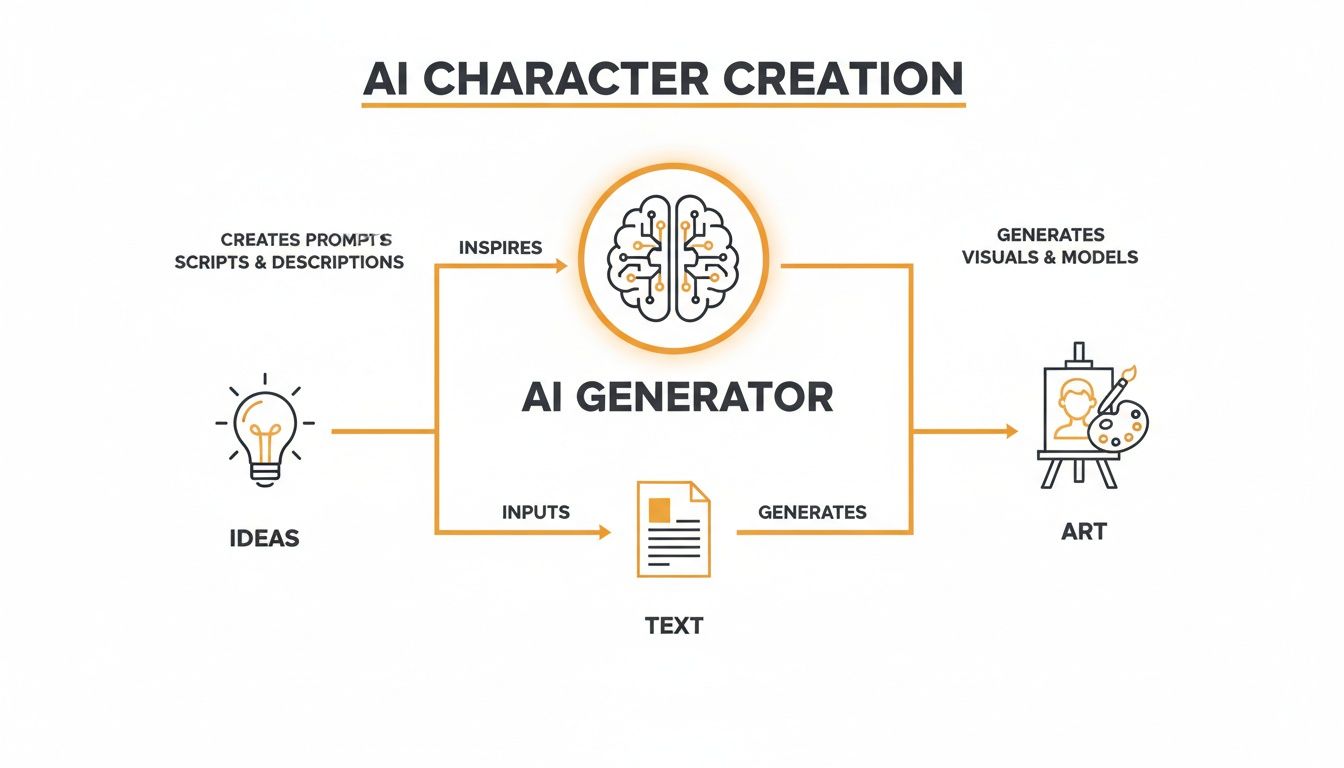
As you can see, it all starts with your imagination. You turn that idea into a text prompt, which then steers the AI as it creates the final piece.
Once you get the hang of this basic workflow—from training on data to refining noise based on your prompt—you get way more control. You're not just pressing a button anymore; you're truly collaborating with a powerful digital artist to bring your vision to life.
Crafting Prompts That Bring Your Vision to Life
The real magic of any AI waifu generator happens in the prompt. Think of yourself as an art director and the AI as your talented, but very literal-minded, artist. Your prompt is the creative brief. The more detailed and clear it is, the closer the final artwork will be to what you’re picturing in your head.
Honestly, learning to write a good prompt is the single most important skill for getting jaw-dropping results. It's less about crafting a perfect sentence and more about giving the AI a clear recipe for your ideal character.
The Building Blocks of a Powerful Prompt
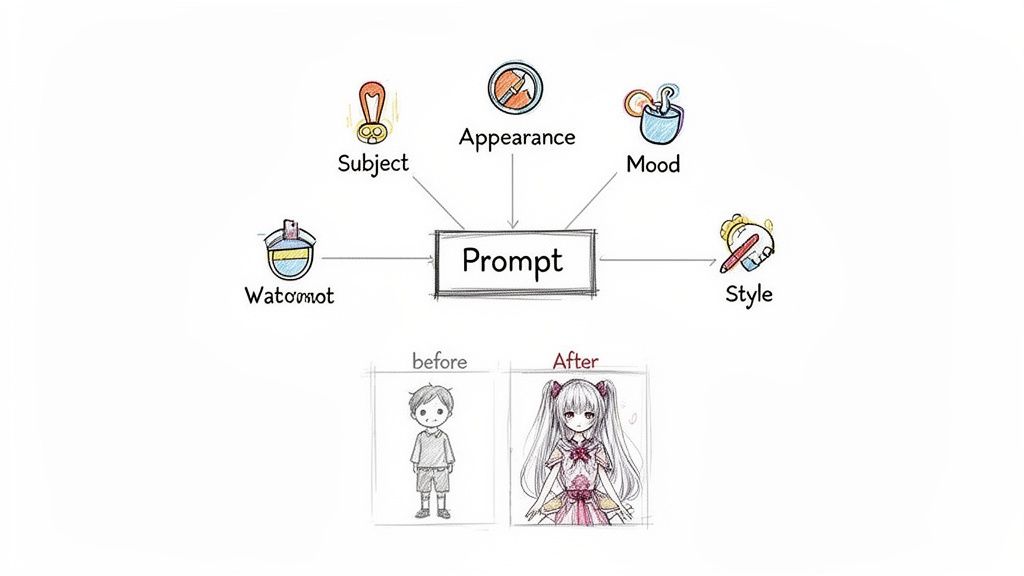
Every solid prompt is built on a few core components. Once you nail these, you'll be on your way to getting consistent, high-quality images every time. Think of these as the foundation of your character design.
Let's break them down:
- Subject: This is the "who" or "what" of your image. Keep it simple and direct to start. Things like "anime girl" or "fantasy knight" work perfectly.
- Appearance Details: Now, let's get specific. What do they look like? This covers hair color, eye color, clothing, and any accessories. Get descriptive! Instead of just "anime girl," try "anime girl with long silver hair, glowing blue eyes, wearing elegant white armor."
- Art Style: This is a big one. You need to tell the AI how to draw the character. Specifying the style is crucial for the final look. You could use terms like "Ghibli style," "shonen manga style," or "digital painting."
Just putting those three elements together can get you pretty far. For example, a prompt like "fantasy knight with black hair, wearing detailed plate armor, shonen manga style" gives the AI a clear, actionable set of instructions.
The AI doesn't get context or subtext like a person does. It takes your words literally. That’s why being specific and descriptive is your most powerful tool for guiding it.
Adding Mood and Atmosphere
Once you've got the basics down, you can start layering in mood and atmosphere to make your art feel more dynamic and emotional. This is where you can really start telling a story. Lighting and environment are your best friends here.
Instead of just describing the character, describe the scene they're in.
- For a warm, gentle mood: Try phrases like "golden hour lighting," "soft morning light," or "standing in a sun-dappled forest."
- For a dramatic or futuristic feel: Go for "cyberpunk neon lights," "dramatic backlighting," or "rainy city street at night."
It's amazing how a small tweak to the lighting can completely transform the feeling of an image. "A girl smiling" is one thing, but "a girl smiling under the warm glow of a paper lantern" paints a much richer picture for the AI.
Controlling the Finer Details
Ready to get that professional, polished look? You can add specific keywords that push the quality and texture of the final image. People often call these "quality tags," and trust me, they make a huge difference.
Here are a few powerful keywords you can sprinkle into your prompts:
- For Quality: "masterpiece," "best quality," "8k," "ultra-detailed."
- For Texture: "watercolor painting," "glossy digital art," "cel-shaded," "oil on canvas."
- For Composition: "full body shot," "portrait," "close-up," "from below."
Let's put it all together. Here’s a quick before-and-after.
Simple Prompt:
anime girl with pink hair
This is okay, but it leaves way too much up to the AI's imagination. You’ll probably get something pretty generic.
Advanced Prompt:
masterpiece, best quality, a beautiful anime girl with long flowing pink hair and vibrant green eyes, wearing a futuristic pilot suit, standing in a spaceship cockpit, cyberpunk neon lighting, glossy digital art, cinematic angle
See the difference? The advanced prompt gives the AI super specific instructions for everything—from her appearance to the lighting and even the final artistic finish. The result will be worlds apart. Playing around with these layers is how you truly unlock the creative power of an ai waifu generator.
Navigating AI Art: A Guide to Creating Safely and Ethically
Jumping into AI art is a blast, but it’s smart to go in with your eyes open. Using an AI waifu generator can unlock some amazing creativity, and getting a handle on the safety, ethical, and legal stuff from the start means you can create with total confidence.
Think of it like being a good neighbor in a new digital space. A little mindfulness goes a long way in making this creative world better for everyone—from the people you share your art with to the original artists who helped train these tools in the first place.
The Big Question: What About the Training Data?
If you hang around AI art circles long enough, you'll hear a lot of talk about training data. This is probably the biggest ethical conversation happening right now. As we covered, these AI models learn their craft by studying millions of images scraped from the internet. This has, understandably, kicked off a huge debate about whether it's fair to use an artist's work to train a model without asking them first.
Many artists feel like their unique styles are being copied without their consent, and they're not seeing a dime for it. On the other side, some argue that this is just how technology evolves—by learning from publicly available information. There’s no easy answer here, but you can be part of the solution. Try to support platforms that are open about where their data comes from or those that make an effort to use ethically sourced image sets.
When you choose generators that care about artistic integrity, you’re helping steer the whole scene in a better, more responsible direction.
Keeping Yourself Safe in the Creative Process
Your privacy and safety should always come first with any online tool. The good news is that most well-known AI generators are safe, but it never hurts to be a little cautious. My best advice? Stick to services that people know and trust—the ones with clear privacy policies and a real community of users.
Here are a few practical things to look out for:
- Do They Have Content Filters? A solid AI waifu generator should have good content filters in place. This is crucial for stopping the creation of harmful or explicit images and keeps the platform a safe and positive space for everyone.
- Guard Your Personal Info: Be suspicious of any site that asks for more personal data than it needs. You really shouldn't have to hand over more than an email for an account or payment details for a subscription.
- Read the Reviews: See what other people are saying! User reviews are a goldmine of information and can tell you a lot about a platform's reliability and how they treat their customers.
A platform's commitment to safety is a huge tell. If a service feels sketchy, has a vague privacy policy, or is hard to find information on, just move on. There are plenty of trustworthy alternatives out there.
AI Art and the Murky Waters of Copyright
The legal side of AI art is still a bit of a wild west, and copyright is the main source of confusion. The question I hear all the time is: "If I make an image with AI, do I own it?" Unfortunately, the answer isn't a simple "yes" or "no."
Right now, in many countries like the United States, art generated entirely by an AI without significant human creative input can't be copyrighted. That means you can't claim exclusive ownership over it like a photographer owns a photo they took.
This is a huge deal, especially if you want to use your AI creations for commercial stuff, like a logo, a brand mascot, or on t-shirts. Since you might not legally own the copyright, you likely can't stop someone else from using the exact same image.
This is exactly why you must read the terms of service for any generator you use. Some platforms give you a very generous license to use what you create, even commercially. Others are much more restrictive. Always, always check the rules before you build a business around your AI art. To get a sense of what to look for, you can learn more about the legal terms and conditions that responsible platforms provide.
So, What Can You Actually Do With Your AI Characters?
Alright, so you've tinkered with the prompts and have a fantastic new character staring back at you from the screen. Now for the fun part: what's next? These aren't just pretty pictures destined to sit in a folder. Think of them as creative launchpads for all sorts of cool projects.
Your generated character is basically a digital actor, ready for you to cast in any role you can dream up. They can become your online alias, the star of a personal project, or even a one-of-a-kind gift for a friend. Honestly, the only real limit here is your own imagination.
Level Up Your Online Identity
One of the most immediate and popular things to do is to create unique avatars for social media and gaming. Let's be real, a custom character helps you stand out in a crowd of default profile pics.
- Custom Avatars: Whip up a unique profile picture for Discord, Twitch, X, or anywhere else you hang out online. It’s a fantastic way to show off your personality without using a real photo.
- Streaming Assets: If you stream, your character can become the face of your channel. Imagine them on your "Be Right Back" screen, channel banners, custom emotes, or even your notification pop-ups.
- Personal Branding: Are you a writer, artist, or content creator? An AI character can act as a memorable mascot for your blog, portfolio, or YouTube channel, giving you a consistent and friendly look.
This hunger for unique digital flair is no small trend. The AI anime generator market, which is part of this world, was already valued at a massive $91.56 billion in 2024. It’s expected to balloon to $667.68 billion by 2032. That tells you just how much people want these kinds of creative tools for their gaming and social lives. You can dive deeper into the booming AI anime generator market on snsinsider.com.
Your AI-generated character isn't just a picture—it's a digital actor you can cast in any role. From a stoic RPG hero to a cheerful stream mascot, you are the director of their story.
Bring Your Creative Projects to Life
Beyond just your online presence, these characters can be a huge boost for your own storytelling and artistic hobbies. They’re perfect for helping you visualize ideas and flesh out your creative worlds.
For example, why not use them as:
- Concept Art for Stories: If you’re a writer, how cool would it be to generate a picture of your main character or villain? Seeing them in front of you can spark new plot points and make descriptions feel so much more real.
- Tabletop RPG Characters: Give your Dungeons & Dragons or Pathfinder character an actual face! A custom portrait is an awesome way to introduce your hero to the rest of the party.
- Personalized Gifts: Take your favorite designs and put them on something real. Think custom stickers, posters, t-shirts, or coffee mugs. They make incredible gifts for you or any other anime fan in your life.
By playing around with different artistic styles, you can build an entire gallery of unique characters. If you're looking for inspiration, check out our waifu-inspired art styles at Tooncraft and see just how varied your creations can be.
Turn Your Photos Into Anime Art
Trying to create a perfect character from a text prompt is fun, but let's be real—it's tough to get an AI waifu generator to capture the likeness of a real person. If you want to see yourself or a friend as an anime character, you need a different kind of AI magic. This is where image-to-image generation shines.
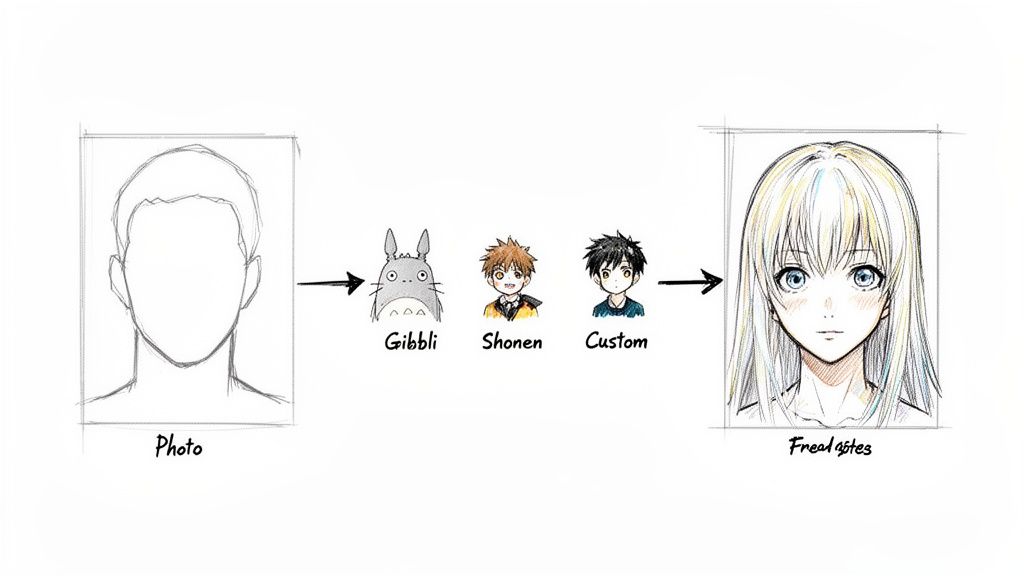
Instead of writing a detailed description, you just give the AI a starting photo. The AI uses that picture as a direct blueprint, redrawing it in a whole new artistic style. This is the secret to creating personalized avatars that actually look like you, just reimagined in the world of anime. It's a fantastic alternative that lets you skip the headache of writing complex prompts.
A Simple Three-Step Process to Your Anime Self
You don't need to be a tech wizard to do this. Tools like Tooncraft have made the whole process incredibly straightforward. In just a few minutes, you can turn a favorite selfie into a jaw-dropping anime portrait.
It really is this simple:
- Choose Your Best Photo: Grab a clear, well-lit photo of yourself or a friend. The better the original image, the more detail the AI has to work with, which means a more accurate final result.
- Select Your Favorite Anime Style: Now for the fun part! Browse through a gallery of iconic art styles. Have you always dreamed of seeing yourself in the soft, whimsical style of Studio Ghibli? Or maybe the high-energy, bold look of Naruto is more your vibe?
- Generate Your Masterpiece: Just click a button, and the AI does the rest. It intelligently analyzes the key features in your photo and redraws them in your chosen style, giving you a custom piece of art that’s ready to share.
This technology is a huge part of the global AI animation market, which has seen unbelievable growth. Valued at USD 110.65 billion in 2025, it's expected to rocket to an incredible USD 1,887.70 billion by 2035—that's a growth rate of 32.8% every year. This massive demand comes from people everywhere wanting more creative, automated ways to express themselves. You can dive deeper into this trend by reading the full AI animation market report on Market.us.
Why This Method Is So Appealing
Using an image-to-image tool is a completely different creative journey than writing prompts from scratch, and it has some serious perks, especially if you’re just starting out.
The real joy of this method is seeing a familiar face—your own—reimagined through the lens of your favorite anime. It connects your real-world identity to the fantasy worlds you love, creating a uniquely personal piece of art.
The biggest benefits are pretty clear:
- So Easy to Use: You don't have to master complex formulas or memorize a dictionary of keywords. Just upload a photo and pick a style you love.
- Consistent Results: Since the AI is working from an actual photo, the final image will look much more like the person than what you can typically achieve with text alone.
- A Personal Connection: There’s just something special about seeing yourself as an anime character. It’s an incredibly fun way to make custom avatars or create gifts that really mean something.
If you’re ready to see what you’d look like in your favorite anime, you can easily create your own custom anime portrait avatar with Tooncraft and start having fun today.
Got Questions About AI Waifu Generators? Let's Clear Things Up.
As you start diving into the world of AI waifu generators, it’s totally normal for a few questions to pop up. This tech is still pretty new for most people, so figuring out the nuts and bolts will help you feel more confident as you create. Let's tackle some of the most common things people wonder about.
Is It Actually Legal to Use This Stuff?
This is the big one, right? The answer really breaks down into two different scenarios. If you're just making art for personal use—say, a new profile picture, a character for your D&D campaign, or just for the fun of it—you’re good to go. You can generate to your heart's content and share your creations with friends without any legal headaches.
But when money gets involved, things get a bit more complicated. Using AI art for commercial use, like for a product you’re selling or a business project, is a different ballgame. The rules here are dictated entirely by the generator's terms of service. Copyright law around AI-generated images is still a bit of a gray area, so it's super important to read the fine print of any platform you use. That's the only way to know for sure what you can and can't do with the art you make.
Are These AI Art Generators Safe to Use?
Your safety online should always come first. The good news is that most well-known, reputable AI art platforms are perfectly safe. These services put a lot of effort into security and have clear policies in place to protect you and your data.
To stay on the safe side, just follow these simple rules of thumb:
- Stick to the big names: Go with platforms that have a solid reputation, good user reviews, and a clear privacy policy you can actually read.
- Look for content moderation: A good generator will have filters to stop people from creating anything harmful or wildly inappropriate.
- Guard your personal info: Be wary of any tool that asks for more personal details than it needs. A legit service usually just needs the basics to set up an account.
By using trusted platforms, you can relax and focus on being creative instead of worrying about your data.
My best advice? Treat AI tools just like any other online service. If a website looks sketchy or asks for weird permissions, just close the tab and find a better alternative. There are plenty of fantastic, trustworthy options out there.
Can I Make an Anime Version of Myself?
Absolutely! This is easily one of the coolest and most popular ways to use this technology. But there's a catch: a standard text-to-image AI waifu generator isn't great at capturing a specific person's likeness just from a description. You can try prompting "a girl with my exact smile," but the AI just won't get it right.
That’s where image-to-image tools really shine. They are built for exactly this kind of task. Services that use this tech can take a photo of you and transform it into your favorite anime style with uncanny accuracy. It’s the easiest way to see what you’d look like as a character in your own show.
Ready to see yourself in a whole new light? With Tooncraft, you can skip the complicated prompts and turn your favorite photos into incredible anime art in just a few clicks. Transform your pictures today at https://tooncraft.ai.