
A Guide to Using an Anime Filter for Photos
Discover how to use an anime filter for photos to create stunning, stylized images. Our guide covers choosing styles, prepping photos, and advanced AI tips.
So, what exactly is an anime filter for photos? It's basically a smart tool, powered by AI, that can take your everyday pictures and magically repaint them in different Japanese animation styles. Whether you're a fan of classic action series or the whimsical, dreamy look of a Ghibli film, a platform like Tooncraft lets you upload a photo and get a custom anime portrait in moments.
Your First Look at Turning Photos into Anime Art
Ever been scrolling through your feed and stumbled upon a friend’s profile picture, but it’s an awesome anime version of them? You probably wondered if they spent hours in some complicated design software. The secret is much simpler: a powerful anime filter for photos.
This isn't just a basic cartoon effect. The tech is smart enough to look at your face, the lighting in your photo, and even your expression to convincingly reimagine you in a specific, well-loved art style.
Think of this as your starting point. We'll walk through the fundamentals to make sure that even your very first try gives you something you're excited to show off.
The Essentials for Great Results
Before you start tinkering with all the cool settings, let's nail down the basics. Your final image quality really boils down to two things: the photo you start with and the style you choose.
- Start with a Good Photo: Your best bet is a clear, well-lit selfie. The AI needs solid information to work its magic, so a high-resolution picture with your features clearly visible gives it the best shot at creating something incredible.
- Pick Your Style with a Purpose: The anime style you select dictates the whole vibe. A bold Naruto-inspired filter gives off a completely different energy than a soft, painterly Ghibli look. A little thought into matching the style to the original photo's mood goes a long way.
For example, you can get a huge range of results just by playing with different photos and filters.
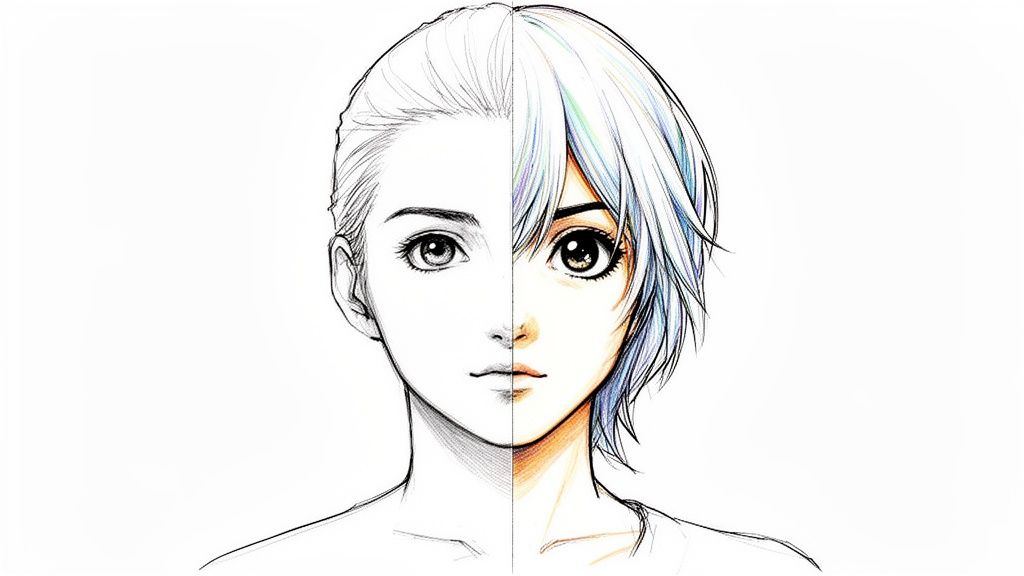
See how the AI doesn't just slap a filter on top? It actually pulls out subtle details from the original picture and translates them into a completely new anime aesthetic. That’s what makes this so much fun to experiment with.
The real goal isn't just to cartoonify yourself. It's about capturing your personality in an art form you admire. A great filter keeps what makes you you while translating it into a beautiful new visual language.
To get a better feel for what's out there, it's a great idea to check out collections of anime portraits and avatars for inspiration. Browsing through what others have created can spark some fantastic ideas before you even upload your first photo.
Finding Your Signature Anime Style
Alright, this is where the real fun starts. Choosing the right anime filter for photos isn't just about slapping a filter on an image; it's about playing art director for your own life. The style you land on will set the entire mood, turning a regular snapshot into something with a totally new personality.
So, what’s the vibe you're going for? Do you want the bold lines and high-octane energy of a modern shōnen series? That could be perfect for a new gaming avatar. Or maybe you're leaning toward the soft, painterly, almost nostalgic feel of a classic Ghibli film—a style that can turn a simple family photo into a piece of art that tugs at the heartstrings. Think of it as a creative playground.
Matching Mood to Style
Here’s the secret: you need to match the emotion of your original photo with the aesthetic of the anime style. When they don't line up, the final image can feel a bit...off. But when you nail the pairing? That’s when the magic happens.
Take a wedding photo, for example. You probably wouldn't want to use a gritty, action-packed filter on it. It just wouldn't fit. But a romantic, watercolor-inspired style? That would amplify the warmth and emotion already there, creating a keepsake that feels incredibly special.
A great anime filter doesn’t just change how a photo looks; it amplifies the story the photo is already telling. It’s about finding a visual language that matches the moment you captured.
This same idea applies to pretty much any photo. That epic shot of you at the top of a mountain after a long hike? It would look absolutely incredible with a filter that cranks up the dramatic shadows and vibrant, adventurous colors. The goal is to be intentional with your choice.
Exploring Popular Anime Aesthetics
To give you a better idea of what’s out there, let’s break down a few of the most popular styles and where they shine. This is by no means a complete list, but it’s a great starting point.
- Shōnen Action Style: Think sharp lines, dynamic shading, and intense expressions. This is your go-to for action shots, gym photos, or a powerful social media profile picture that really pops.
- Slice-of-Life & Ghibli-esque: This one is all about softer colors, gentle lighting, and a hand-painted, storybook quality. It works beautifully for photos of your pets, kids, peaceful landscapes, or just those candid, everyday moments with people you love.
- 80s & 90s Retro Anime: You know the look—a distinct grainy texture, bold color palettes, and those classic character designs. If you’re chasing a nostalgic vibe, this is it. It can add a super cool, vintage flair to casual portraits or photos with friends.
Honestly, the best advice I can give is to just experiment. Don't hesitate to run the same photo through a few different filters to see what clicks. Sometimes the most unexpected choice ends up being the most memorable, leaving you with a piece of unique art that’s all yours.
How to Prep Your Photos for Amazing Results
The final anime image you get is only as good as the photo you start with. It's that simple. Think of the AI as a talented artist and your picture as their only reference. If you hand them a blurry, dark, or chaotic photo, you’re not giving them much to work with, and the result will probably look a little muddy or distorted.
But a tiny bit of prep work? That makes all the difference. We're not talking about a professional photoshoot here—just a few small tweaks that give the AI a perfect canvas to create something truly special.
The Foundation of a Great Anime Portrait
Clarity is king. The AI needs to see your facial features to translate them into an anime style, which means a high-resolution image is an absolute must. A pixelated photo will always lead to a pixelated anime character.
Good lighting is a very close second. You want soft, even light that hits your face without creating harsh, distracting shadows. This helps the AI map the contours of your face, which is essential for getting those expressive eyes and a well-defined jawline right. Whatever you do, try to avoid backlighting—where the light source is behind you—as it’ll plunge your face into shadow.
My Go-To Tip: Natural light from a window is your best friend. Seriously. It’s soft, flattering, and gives the AI all the clear detail it loves to work with. No fancy ring lights needed, just face the window and snap a picture.
Your Simple Photo Prep Checklist
Before hitting that "upload" button, just run through this quick mental checklist. It takes less than a minute but can be the difference between a throwaway result and a stunning piece of art. These guidelines work wonders for pretty much any style, including when you're creating adorable custom chibi-style art.
Here’s what I always look for in a source photo:
- Clear Facial Features: Make sure your eyes, nose, and mouth are totally visible. Don't let hair, hands, or deep shadows cover them up, because that’s where the AI focuses most of its attention.
- Simple Background: A busy, cluttered background can really confuse the AI. Sometimes it even tries to blend parts of the background into your portrait. A plain wall or a softly blurred outdoor scene is perfect.
- Direct Gaze (Usually): This isn't a hard rule, but I've found that photos where you're looking at or near the camera tend to produce the most classic and compelling anime portraits.
- Sufficient Resolution: Always try to use the original file from your phone or camera. Screenshots or images you've saved from social media are usually compressed, and that compression kills the detail the AI needs.
Starting with a clean, well-lit, and high-resolution photo sets the stage for the anime filter to do its absolute best work. It's a small effort that pays off big, turning a fun little experiment into a piece of personalized art you’ll actually want to show off.
Advanced Tips for Customization and Consistency
So you’ve created a few awesome anime-style images and now you’re hooked. It's easy to start thinking bigger. What if you need a whole batch of avatars for your social media profiles? Or maybe you want a consistent character to represent your brand online? This is where using an anime filter for photos evolves from a fun party trick into a serious creative tool.
The biggest hurdle you'll run into is consistency. It's one thing to make a cool image, but it's another to make your anime self look like the same person across a dozen different pictures. You want the same character, just with new poses, expressions, or outfits. This is absolutely crucial if you're building a recognizable online identity.
Fine-Tuning Your AI Creations
Most AI tools give you a few knobs and dials to play with, letting you control how much creative liberty the AI takes. I like to think of it as a leash. On one end, you can keep it short, and the AI will stick very closely to the structure and details of your original photo. On the other end, you can let it run wild, and it will lean heavily into the chosen anime style, sometimes reinterpreting your features in dramatic ways.
Finding that perfect balance really comes down to experimenting. If you're creating a brand mascot, for example, you’ll probably want to dial up the consistency to keep things looking uniform. But if you’re just making a series of artistic portraits for fun, you can let the AI get a little more creative.
Before you even touch those settings, though, getting the input right is half the battle. This simple prep work is the foundation for getting great results every single time.
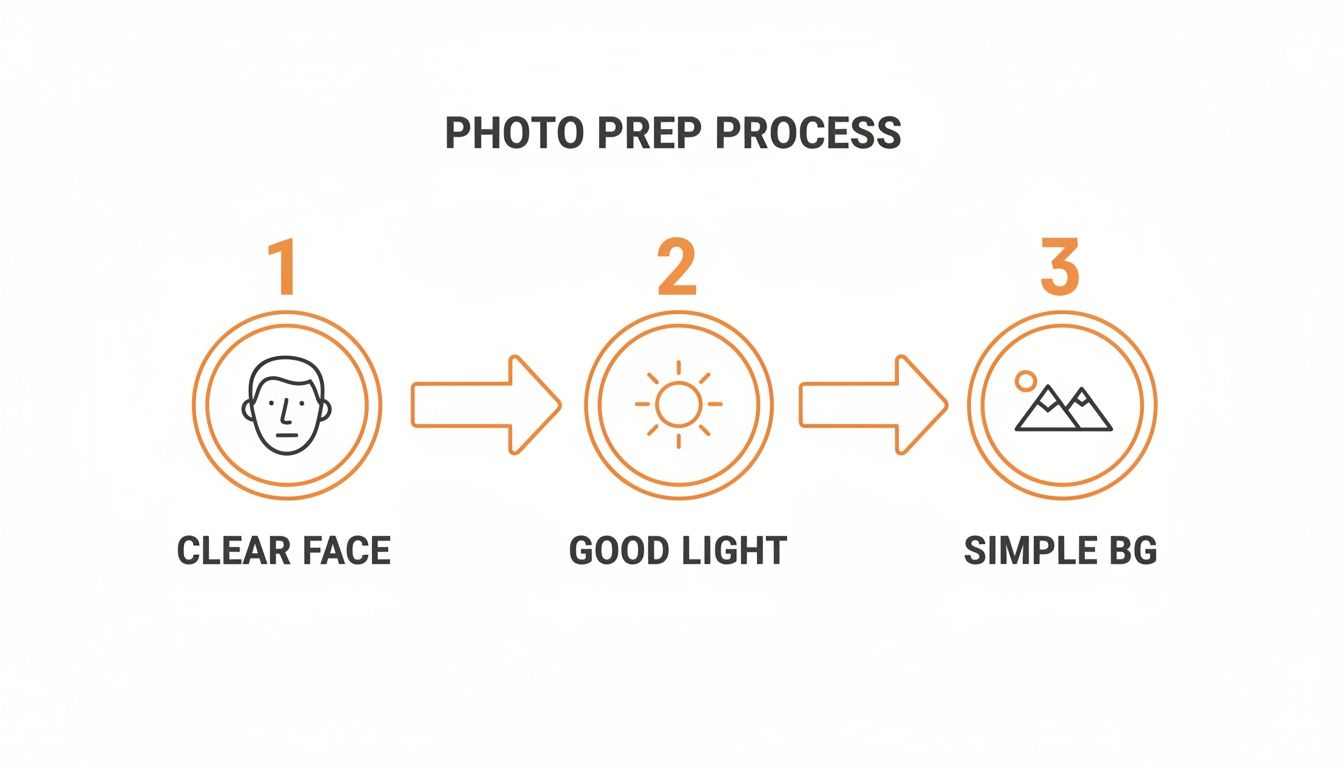
Giving the AI a clean photo with a clear face, good lighting, and a simple background is a game-changer. It provides clean data to work with, which makes it so much easier to maintain your character's look across different images.
Building a Cohesive Visual Story
Once you nail down a consistent look, you can start telling a real visual story. Imagine generating images of your anime persona in different situations: sitting at a desk working, exploring a fantasy world, or showing a range of emotions for reaction images. For content creators, this is an absolute goldmine for producing a steady stream of unique visuals for YouTube thumbnails, Instagram posts, or Twitch overlays.
And there's a huge commercial appetite for this kind of personalization. Just look at the global anime figure market—it was valued at around USD 28.23 billion in 2024 and is expected to soar to USD 62.7 billion by 2032. What’s driving that? A deep personal connection. In fact, about 80% of those purchases are for personal use, not just collecting. This just goes to show how much people want to see themselves in the styles they adore, and that's exactly what these anime filters tap into.
This isn't just about chasing the latest trends, either. A lot of us feel a pull toward classic aesthetics. If you’re trying to capture that timeless, hand-drawn feel, you can find entire collections dedicated to retro 80s and 90s anime styles that instantly bring on the nostalgia.
Key Takeaway: Consistency doesn't mean creating carbon copies of the same image. It’s about building a recognizable character who can exist in different scenes and situations, letting you create a compelling visual narrative for your personal projects or your audience.
By mastering these techniques, you can go from making one-off edits to building a repeatable and scalable workflow with your favorite anime filter for photos.
Sharing Your Art and Understanding What You Can Do With It
You’ve done it. You’ve created the perfect anime-style image and now it's ready for its big debut. But before you blast it across your social media, let's talk about the final, crucial part of the process: exporting and understanding your rights. This stuff might sound boring, but it's super important, especially if you have bigger plans than just a new profile pic.
Getting Your Image Out Into the World
Exporting your masterpiece isn't a one-click-and-done deal. Where the image is going to live dictates the settings you should use.
Think about it this way: if it’s for an Instagram post or a Discord avatar, a standard JPEG is your best friend. It’s small, loads fast, and looks great on a screen. But what if you want to print it on a t-shirt or make a killer poster for your wall? For that, you’ll want the best quality you can get—a full-resolution PNG file is the way to go to keep things crisp.
So, Who Actually Owns This Art?
This is where things get interesting. When you use an AI tool, who really owns the final image? The answer is almost always buried in the platform’s terms of service.
With a tool like Tooncraft, for example, grabbing a paid plan usually gets you a watermark-free image and the green light for commercial use. That means you could design a mascot for your startup, create some eye-catching marketing visuals, or even build a whole aesthetic for your YouTube channel.
Before you go all-in with any platform, it’s always a good idea to quickly check their policies. I always look for a few key things:
- Commercial Use: Are you allowed to use these images to make money?
- Data Privacy: What happens to the photos you upload? Are they stored securely?
- Watermarks: How do you get rid of them, and does removing them grant you different rights?
Here’s the bottom line: know the difference between personal and commercial use. Using your anime self-portrait on your personal blog is a world away from plastering it on an ad campaign. A quick read of the rules can save you a massive headache later.
Post and Share with Confidence
Once you've got the rights figured out, you can share your work without a second thought. It's also cool to see how the industry is handling this. Many AI tools are now adding things like invisible digital watermarks or subtle visual cues to show that an image was created with AI, which is great for building a more transparent and trustworthy online space.
At the end of the day, an anime filter for photos is an incredible tool for everything from having a bit of fun to launching serious professional projects. By picking the right export settings and knowing your usage rights, you can confidently let your new anime creations shine, wherever you choose to share them.
Inspiring Ways to Use Your Anime Photos
So, you've figured out how to turn your photos into anime, but what's next? You might be surprised by just how many cool things you can do with this. It's not just about a quirky new profile picture—this is a gateway to a ton of creative projects.
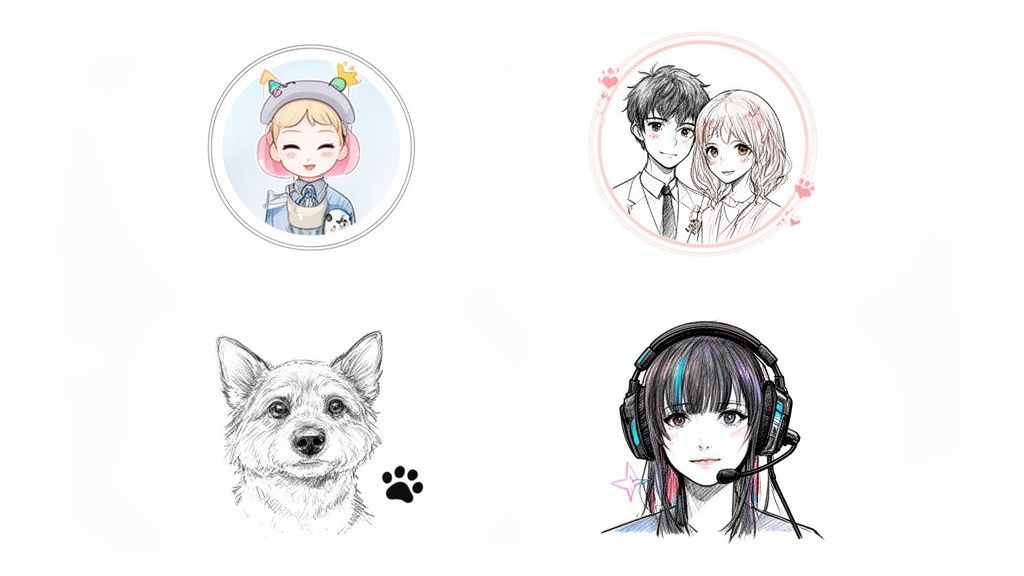
For starters, think about keepsakes. An anime filter can breathe new life into your family photos. Imagine turning that annual group shot into a heartwarming anime scene for your holiday cards. Or what about a picture of your kid or your dog? Transforming it into a custom portrait is a fantastic way to capture their spirit in a really unique, whimsical style. Honestly, they make for some of the most personal and memorable gifts you can give.
Couples can get in on the fun, too. I've seen people create stunning, one-of-a-kind art for their wedding invitations or anniversary gifts. Taking a favorite photo and turning it into a romantic, storybook illustration is a beautiful way to tell your love story visually.
For Creators and Brands
If you're a content creator, this is where things get really interesting. An anime filter for photos can be a game-changer for building a distinct brand identity. Having a consistent anime avatar across your platforms—think Twitch, YouTube, and Discord—makes you instantly recognizable and helps you stand out in a crowded space.
And this isn't just about a fun aesthetic; it’s a smart move. The global anime market is absolutely massive and still growing, expected to jump from around USD 30–35 billion in 2025 to a staggering USD 129.7 billion by 2037. Tapping into that style connects you with a huge, passionate audience. You can dig into the numbers yourself with these anime market's growth projections.
The best use of an anime filter is one that feels personal. Whether it's for a heartfelt gift or a professional brand, the goal is to capture a specific feeling or identity in a style you love.
More Creative Ideas
But why stop there? The possibilities are pretty much endless. Here are a few more ideas I've seen people run with:
- Cosplayers: Give your cosplay photos a new dimension. Turning them into stylized character art is a perfect way to bring your creations to life in a different medium.
- Gamers: Level up your channel with custom emotes, banners, and thumbnails that show off your gaming persona in a cool, animated style.
- Storytellers: If you’ve ever wanted to create a comic or visual novel, this is an incredible way to generate character concepts and illustrations to get your story off the ground.
From personal projects to building a professional brand, transforming your photos into anime opens up a whole new world of creative expression. It’s all about reimagining your world in a vibrant, artistic way that feels uniquely you.
Got Questions About Anime AI? We've Got Answers
Jumping into AI art is a blast, but it's natural to have a few questions. I get them all the time. Whether you're just curious or a pro looking to refine your workflow, here are some of the most common things people wonder about when using an anime filter.
What Kind of Photo Works Best?
Honestly, the cleaner your starting photo, the better the result. Think of it as giving the AI the best possible ingredients.
A clear, well-lit portrait is your golden ticket. Try to find a photo where your face is front and center, with no harsh shadows or hair covering your features. A simple, uncluttered background is also a huge plus, as it helps the AI zero in on you instead of getting distracted by what's going on behind you.
While you can use group photos, I've found that single-person shots almost always produce a more detailed and accurate anime version.
Can I Actually Use These Anime Pictures for My Business?
This is a big one, and the answer is: it depends on the tool you're using.
Most platforms, like Tooncraft, have different rules for different plans. Typically, if you're on a paid plan that gives you watermark-free images, you're cleared for commercial use. That means you can use them for marketing materials, brand avatars, or social media for your business.
My advice? Always, always double-check the terms of service for the specific tool you're using. It’s a simple step that can save you a lot of headaches down the road.
How Does the AI Make My Character Look the Same in Every Picture?
It's pretty clever, actually. The more advanced AI models don't just slap a filter on your photo; they learn your unique features from the images you upload.
When you use features built for consistency, the AI essentially creates a "character profile" based on things like your face shape, eye color, and hairstyle. It then uses that profile as a reference for every new image it generates, which is how you can get a whole series of pictures with your anime self in different poses and scenes, all looking perfectly consistent.
Ready to see yourself in a whole new light? Give Tooncraft a try and explore over 50 incredible anime styles. You can start creating your anime art at tooncraft.ai.