
Animate Photo Online Free: Quick Guide to Turning Images into Videos
animate photo online free: Learn to turn static images into engaging videos with simple AI tools and expert tips.
Have you ever scrolled past a photo that seemed to jump right off the screen and wondered, "How did they do that?" If so, you've come to the right place. You can actually animate photos online for free using some pretty amazing AI tools that turn your favorite pictures into moving videos with just a few clicks.
It makes professional-looking animation something anyone can do.
Bring Your Photos to Life with Free Online Animation
Animating photos isn't just a gimmick for Hollywood studios anymore. It's quickly become a go-to trick for social media influencers, families wanting to share memories in a new way, and even businesses trying to create content that stops the scroll. You can forget about wrestling with complicated software or needing an art degree. Tools like Tooncraft have made the whole process as simple as uploading a photo and picking a style you like.
So, Why Is Everyone Animating Their Photos?
Let's be real: the demand for eye-catching content has never been higher, and animated photos are a fantastic way to stand out. This isn't just a fleeting trend; it's part of a massive shift in technology. The market for generative AI in animation was already worth USD 1.32 billion in 2023 and is expected to skyrocket to USD 23.60 billion by 2032.
Why the explosion? Because AI automates the tricky parts, slashing production time from days or weeks down to just a few seconds. It's easy to see why these tools are becoming a must-have.
In this guide, I'll walk you through how to get started. We’ll cover everything from picking the right pictures to sharing your finished masterpiece, focusing on simple, practical steps so you can jump in and start animating today.
Honestly, with the right tool, you can go from photo-taker to animator in minutes. Think about it—you could create a unique animated profile picture or design a truly unforgettable e-card for a friend's birthday. The possibilities are endless.
And this is just the beginning. Once you get the hang of animating a single photo, a whole new world of creative projects opens up. For anyone curious about what’s next, you might want to check out our guide on how to create AI videos from the ground up.
Choosing the Right Photo for Stunning Animation
Here’s a little secret I’ve learned from countless hours of animating photos: the magic starts before you even upload a picture. Your starting image is hands-down the most important piece of the puzzle. While it’s tempting to just grab any old photo and see what happens, a little prep work makes a world of difference when you animate a photo online for free.
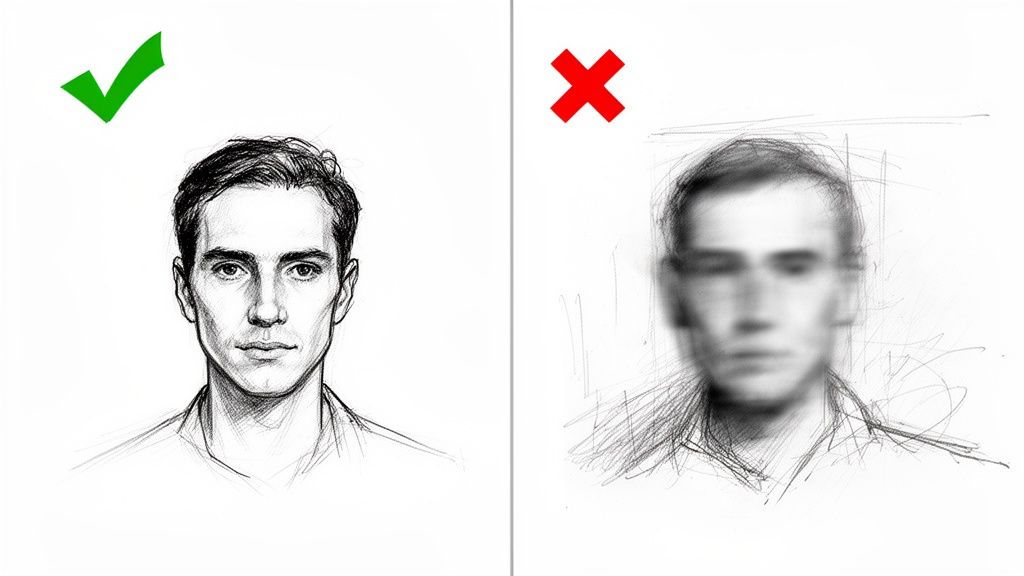
Think of the AI animation tool as a talented but very literal artist. If you give it a blurry, dark photo, it's going to struggle to see the details and will likely give you a muddy, distorted result. But give it a clean, sharp, well-lit image? That’s when you get something truly special.
What Makes a Photo "Animation-Ready"?
You don’t need a professional headshot, but a few key details will seriously boost your animation quality. A clear, forward-facing portrait is often the gold standard. It gives the AI a perfect, unobstructed view of all the facial features it needs to bring to life, like the eyes, nose, and mouth.
Lighting is just as important. Have you ever noticed how harsh shadows can completely change how a face looks? The AI notices, too, and it can get confused, leading to some weird artifacts in the final animation. Pro tip: soft, natural light from a window is almost always your best bet.
Here are the big things to look for when picking your photo:
- Sharp Focus: Is the face crisp and in focus? If it’s even slightly blurry, the AI will have a tough time.
- Good Lighting: Look for soft, even light. Try to avoid photos with deep shadows or bright, blown-out highlights that erase details.
- Unobstructed View: Make sure nothing is covering the face—no hands, sunglasses, or even heavy bangs over the eyes. The AI needs to see everything!
- Simple Background: A busy background can sometimes confuse the AI. A clean, simple backdrop helps the subject stand out and keeps the focus where it should be.
To make it even easier, here's a quick checklist I use to decide if a photo is a good candidate for animation.
Photo Selection Checklist for Optimal Animation
| Characteristic | What Works Best (Good) | What to Avoid (Poor) |
|---|---|---|
| Focus & Clarity | The subject's face is sharp and clear. | The image is blurry or has motion blur. |
| Lighting | Even, natural light with soft shadows. | Harsh shadows, overexposure, or low light. |
| Facial View | Face is mostly forward-facing and visible. | Face is turned to the side, covered, or in profile. |
| Obstructions | No hair, hands, or objects covering the face. | Sunglasses, hats, or hands block key features. |
| Background | Simple, neutral, or non-distracting. | Cluttered, busy, or has distracting elements. |
| Resolution | High-resolution image (more pixels = more detail). | Low-resolution, pixelated, or heavily compressed image. |
Keep these points in mind, and you'll be setting yourself up for success from the very beginning.
Think About Your Desired Animation Style
The type of photo you start with can also nudge you toward certain animation styles. For instance, a dramatic, tightly cropped portrait is a fantastic candidate for a bold anime or comic book style, since it really lets you emphasize those expressive eyes and facial movements.
On the other hand, a fun, full-body shot might be a better fit for a classic cartoon style, where the character’s entire pose and energy contribute to the look. While experimenting is half the fun, starting with a photo that naturally fits your end goal gives you a serious head start.
My best piece of advice is this: A better source photo always leads to a better animation. Spending an extra minute to find that perfect, well-lit shot will save you a ton of frustration and give you a final result you can’t wait to share. Seriously, this one step changes everything.
Bringing Your Photo to Life with Tooncraft
Okay, you've got your image prepped and ready to go. Now for the fun part—actually making it move. We're going to jump right into Tooncraft to animate a photo online for free. Honestly, the whole process is surprisingly simple. Even if you've never animated anything in your life, you'll be cranking out some seriously cool clips in no time.
I'll walk you through everything, step by step. We'll cover uploading your image, picking the perfect animation style, and getting your final video ready to share. Let's get started.
Kicking Things Off in Tooncraft
First, pop over to the Tooncraft website. You’ll see a clean, no-fuss layout that gets straight to the point. The upload area is front and center, so you know exactly where to begin.
Just look for the big "Upload Photo" button—that's your gateway. Give it a click, and it’ll pull up a file browser. Go ahead and find that awesome, high-quality image you prepared earlier. Once you select it, the tool quickly gets it ready for its transformation.
Here's a look at the starting screen. It’s pretty self-explanatory, with the upload on the left and a gallery of styles on the right.
As you can see, it’s all laid out to help you visualize what’s possible right from the get-go.
Finding Your Perfect Animation Style
Once your photo is uploaded, you'll see it on one side of the screen. On the other side is where the real magic happens: Tooncraft’s library of animation styles. This is your creative playground. You can scroll through a ton of different options, each with its own unique vibe.
Think about the feeling you're going for. What's the story behind your photo?
- Looking for something intense and action-packed? Check out the styles inspired by shows like 'Dragon Ball Z' or 'Naruto'.
- Want a more gentle, enchanting feel? The Ghibli-esque or painterly styles are perfect for adding a bit of whimsy.
- Going for a fun, classic cartoon look? You can't go wrong with styles that mimic 'The Simpsons' or have that Pixar-like charm.
Click on any style, and you'll get a quick preview of how it will look on your image. My advice? Don't hold back. Click on everything that looks interesting. The best part about these online tools is how easy it is to experiment without any commitment. You're just looking for that perfect fit.
It's amazing how accessible this has become. Individual creators—from social media managers to families just having fun—now make up over 40% of the market. People are using free online animators for everything, and it works. Some studies even show animated posts can get up to three times more engagement. It’s a huge shift from the days when animation was exclusively for big studios. Learn more about the growth of AI animation generators.
Found a style you love? Great! You’re just about done. Hit that 'Generate' button and let the AI do its thing. It works by analyzing your photo, figuring out the key features, and then meticulously applying the animation frame by frame.
After a few moments, your static picture will be reborn as a dynamic little video clip. You can preview the final result, download it, and get ready to share it with the world. And if this gets your creative juices flowing, you should definitely browse our full collection of AI video styles to see what else is possible.
Putting Your Animated Photos to Work: Creative Ideas
Once you’ve animated your first photo, you'll see that the technical part is just the beginning. The real fun starts when you think about why you're animating it and what story you want to tell. It’s all about finding that perfect style to match the mood of your picture.
Think of yourself as the director of your own memories. Got a killer action shot from the gym or a weekend sports match? A high-energy, dynamic effect like a 'Dragon Ball Z' style from Tooncraft will amplify that intensity. On the other hand, a quiet, cherished family photo probably calls for something softer. A gentle, painterly look or a Ghibli-inspired animation would feel much more fitting. The style you pick really does change everything.
This whole process is surprisingly simple, which is great because it lets you spend more time on the creative stuff instead of getting bogged down in complicated software.
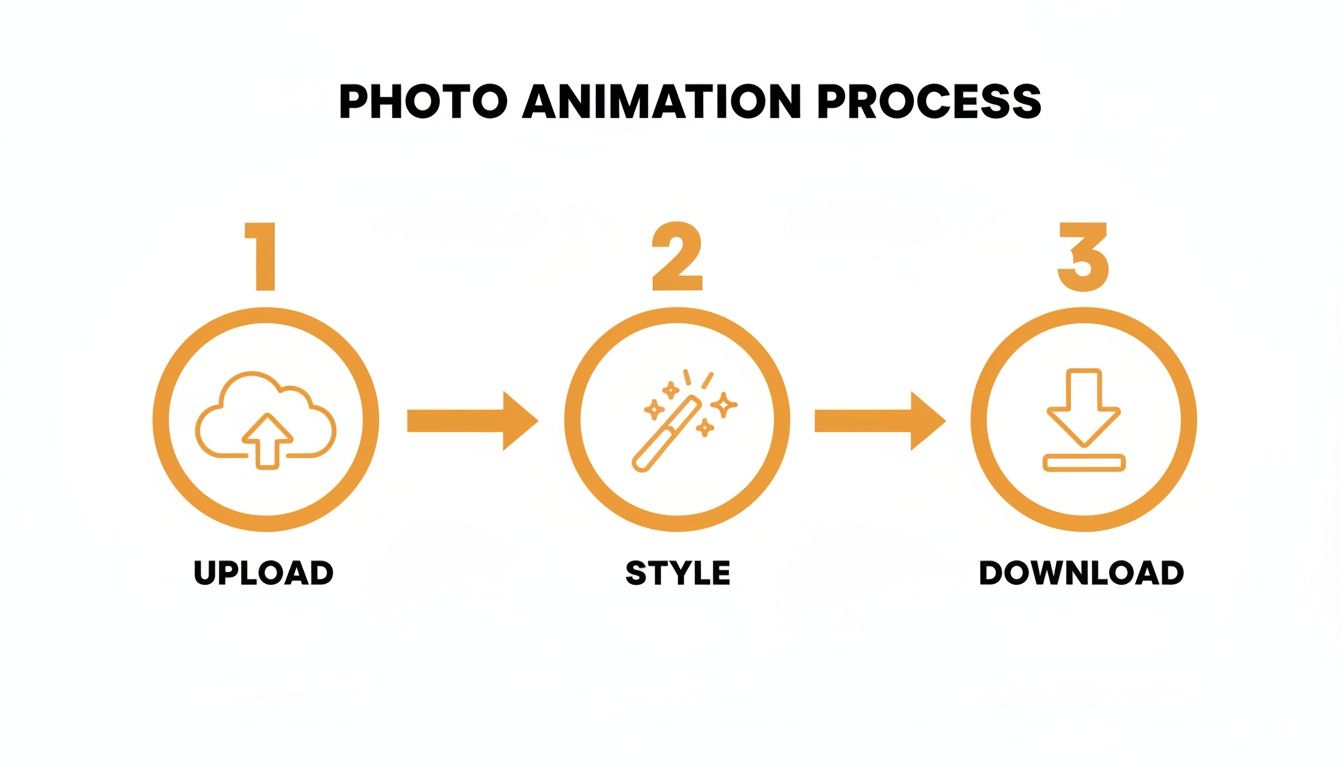
It really just comes down to uploading your photo, picking a look you like, and hitting download. That simplicity means you can try out a bunch of different ideas without wasting a ton of time.
Inspiring Ways to Use Your Animations
So, what can you actually do with these animated photos? The possibilities are endless, spanning from deeply personal projects to really practical marketing assets. Here are a few ideas to get you started:
- Unforgettable Wedding Keepsakes: Take a favorite wedding picture and turn it into an animated cartoon. It’s a wonderfully modern way to remember the day and makes for a killer anniversary gift.
- Stand-Out Gaming Avatars: Design a unique, animated profile picture for your Twitch, Discord, or YouTube channel. It’s a small touch that helps your personal brand pop in a very crowded space.
- Pet Portraits with Personality: We all have that one photo that perfectly captures our pet's goofy personality. Animating it just takes it to the next level and makes for hilarious, heartwarming social media gold.
- DIY Business Mascots: If you're running a small business, you can create an animated character for your brand without shelling out big bucks for an artist. It's perfect for social media campaigns or just adding some life to your website.
The real magic here is that this technology is now in everyone's hands. You’re not just making content; you're creating something personal and dynamic that used to require years of training and expensive software.
Creative Freedom Without the Cost
The arrival of free online animation tools has been a huge deal for creators on a tight budget. When you animate a photo online for free, you can slash your costs by up to 80% compared to hiring someone to do it manually.
This has completely opened the doors for streamers who want to build a whole library of poses or marketers who need to create an eye-catching event invite without blowing their budget. Tooncraft already has over 10,000 users around the world, from gamers on Twitch to parents looking for that perfect cartoon portrait of their kid. It just goes to show how many people can find a use for this.
Ultimately, animating your photos is about more than just a cool visual trick. It’s about breathing new life into your favorite moments and sharing them in a way that feels fresh and exciting. If you need a little more inspiration, you can always browse Tooncraft's cartoon style collections to see what's possible.
Getting Your Animated Masterpiece Out There
You did it! You brought a static photo to life, and now you've got this amazing little animation sitting on your computer. But what's the point of creating something cool if you don't share it? Let's talk about the final, crucial step: getting your work seen by the world.
Thinking a little bit about how and where you post can make a huge difference. It can be the one thing that separates an animation that gets a few likes from one that really takes off when you animate a photo online free.
First things first, you have to export it. When you get to the export screen, you'll see a few file format options. While the old-school GIF is tempting for its simplicity, I'd steer clear. GIFs often have chunky-looking colors and can create surprisingly large files. For pretty much any social media platform you can think of, MP4 is the way to go. It keeps your animation looking crisp, the file size manageable, and it plays everywhere.
Play by the Platform's Rules
Every social media app has its own vibe and, more importantly, its own technical quirks. You can't just blast the same file everywhere and expect great results. To really get noticed, you need to tailor your animated photo for each platform.
Here's a quick rundown for the big players in vertical video:
- Instagram Reels & TikTok: This is the land of short, snappy, full-screen video. You absolutely want to use a 9:16 aspect ratio (that's 1080x1920 pixels) so your animation fills the whole phone screen. Keep it short and sweet—under 15 seconds is usually the magic number to keep people watching on a loop.
- YouTube Shorts: It's a similar game here, with the vertical 9:16 format being king. The big difference with YouTube is the power of search. Spend a moment on your title and description. What keywords would someone use to find an animation like yours? Pop them in there.
- Pinterest Idea Pins: Pinterest is all about visual discovery, which makes it a fantastic spot for animated photos. Stick with the 9:16 format, and put some thought into your cover image. That first frame is what will make someone stop scrolling and tap to see your creation.
It’s not just about uploading a video. It's about making it look like it belongs on the platform. When you take a few seconds to format it right, the algorithm sees that you're creating content with its audience in mind, and that can give your reach a serious boost.
Write a Caption That Connects
Your animation is the main event, but a good caption and the right hashtags are its best friends. Don't just throw your video up with a generic description. Tell a little story! Was this a favorite family photo? A wild experiment with a new art style? A caption that gives a little bit of context can be a huge driver for comments and shares.
Hashtags are your ticket to reaching people who don't follow you yet. The trick is to use a mix of broad and super-specific tags.
- Broad Tags:
#photoanimation,#digitalart,#motiongraphics - Tool-Specific Tags:
#aianimation,#generativeart,#tooncraft - Niche/Style Tags:
#animeart,#pixelart,#ghibliinspired
And don't forget to think outside the social media box! An animated photo can be an awesome, dynamic header for your email newsletter. It can liven up a boring PowerPoint or Google Slides presentation. It can even be the hero video on your website's homepage. You made something awesome, so don't be afraid to show it off in as many places as you can.
Common Questions About Animating Photos Online
Jumping into AI photo animation for the first time usually sparks a few questions. I get it—it’s a pretty new technology, and figuring out how it all works, what it costs, and what you can really do with it is the first step to making something cool.
To help you get going without a hitch, I've put together some straight-to-the-point answers to the questions I hear most often. Let's clear things up so you can get back to the fun part: creating!
Is It Actually Free to Animate a Photo Online?
Yes, it absolutely is! Plenty of the best online tools, including Tooncraft, give you a fantastic free experience right out of the gate. When you sign up, you’ll typically get a handful of free credits, which means you can animate a photo online free of charge immediately.
These starting credits are perfect for playing around. You can test out different animation styles, see how various photos look, and get a few projects under your belt. While there are always paid plans for people who need to create a lot of videos, need faster processing, or want to remove watermarks, the free option is surprisingly capable. You can make, download, and share awesome animations without ever pulling out your wallet.
What Photos Get the Best Animation Results?
This is a big one. For the most impressive animations, you really want to start with a clear, high-resolution photo. The main thing to remember is to use a picture where the subject's face is well-lit and not blocked by things like sunglasses, hands, or deep shadows.
My Pro Tip: A clean, simple background is your best friend. An uncluttered backdrop helps the AI focus all its attention on the person's face, which leads to a much more detailed and expressive animation.
While you can try animating group shots, single-person portraits almost always give you those jaw-dropping, lifelike results. Steer clear of blurry or dark photos; the AI really needs sharp details to work its magic. Honestly, a great starting photo is the single most important ingredient for a great final video.
How Long Does the Animation Process Take?
You'll be shocked at how fast this is. The AI does all the complicated work, so the entire process—from uploading your photo to downloading your finished video—usually takes just a couple of minutes.
The part you actively have to do is super quick. We're talking less than a minute to upload your picture, pick a style you like from the library, and hit "generate." The AI then takes over, crunching the data and applying the animation behind the scenes. This speed makes it a fantastic tool for whipping up timely social media posts on the fly.
Can I Use Animated Photos for My Business?
Absolutely! This is one of my favorite use cases. Animated photos are a clever and super cost-effective way to create marketing content that actually stops the scroll.
Think about it:
- Turning your company logo into a dynamic animation.
- Creating eye-catching social media ads that don't look like everything else.
- Adding a unique visual touch to your website’s hero section.
It’s an excellent way to produce custom video content that helps your brand stand out. Just one thing to keep in mind: for commercial use, it’s always smart to double-check the platform’s terms of service. Premium plans usually come with a commercial license, making them a perfect, worry-free solution for any business.
Ready to see what you can create? Tooncraft makes it incredibly simple. Animate your first photo for free and see the magic for yourself!